The Markdown Link no. 50
Nine markdown editors that stand out from the crowd of more than 100 apps covered in the Markdown Link series of posts so far
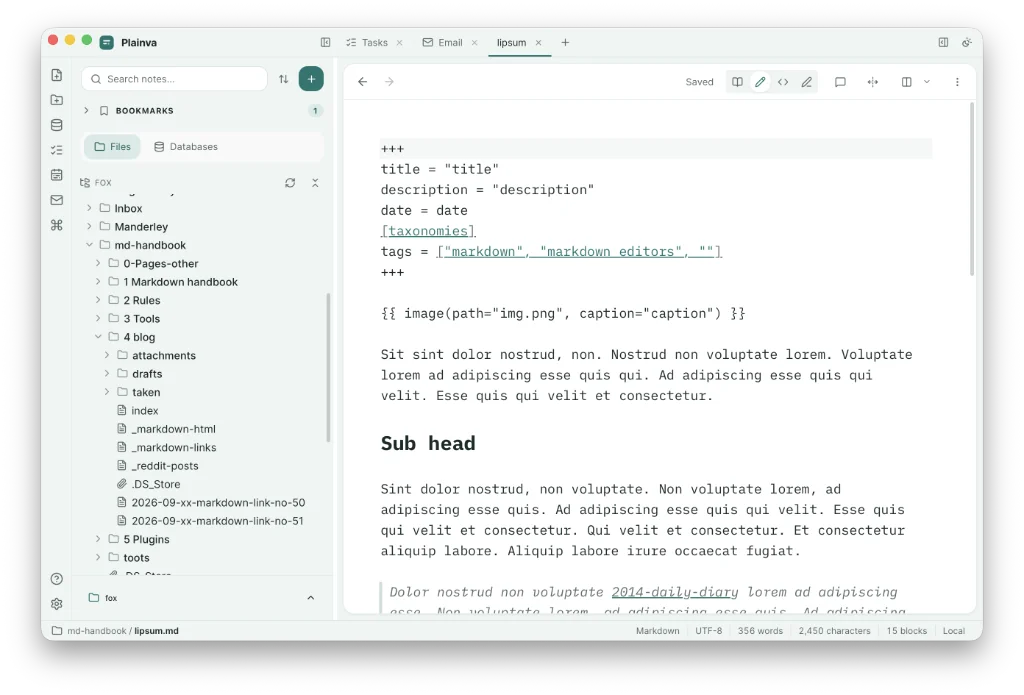
This is the ‘best of’ the markdown editors1, 2, 3 to have appeared in the Markdown Link series of posts.
It looks back over previous editions to find those markdown editors that stood out for one reason or another. Of the more than 100 apps covered so far, the field has been trimmed to nine apps that warrant your attention.
Some, such as Nota, remain in beta and look unlikely to budge from there. That’s a shame because Nota is a good app. And Dumbnote has not been updated since I downloaded it in March. Unless something happens with these apps to shake up the world of markdown, they won’t make a second appearance in Markdown Link no. 100.
FSNotes
Review: November 2025
Seems a shame to ignore FSNotes, because it was the first of the current crop of markdown editors I reviewed here. So I won’t.
It is currently on v7.3.2, up from 7.0.0 the last time I used it. FSNotes is open source, with many of the shortcut keys based on Notational Velocity, a predecessor of nvALT, so that makes it familiar. One way to create a new note is to simply start typing its title in the search field. If the title isn’t already present, hit return to create a new note.
FSNotes works best if you your system uses tags. Personally, I prefer folders, but the app does not recognise subfolders, nor does the developer have any plans to add them in future.
Additional features include tasks, maths equations, tables, footnotes, fenced code blocks, graphs, Git integration and security, which allows you to ‘autolock’ encrypted notes.
Octarine
Covered in: March 2026
When I looked at Octarine back in Markdown Link no. 9, it was, to all intents and purposes, a complete editor. But it was still in beta while its developer caught up with a number of bugs. Releases have jumped from 0.40.2 to 0.52.1, and it’s on Testflight. Pricing remains at $79, despite my suggestion that a lower price point might attract more users.
Dumbnote
Covered in: March 2026
Free and open-source Dumbnote stands out for one reason only: all the sidebar action goes on on the right-hand side of your monitor, while what remains of your screen is taken up by the editor. Strangely, coming from a magazine publishing background, where right-hand pages are considered the preserve of advertising, this works; the sidebar does not intrude as I thought it would. Dumbnote remains on v3.4.2, downloaded back in March, and is reliant on tags to sort your notes, rather than subfolders, the same as FSNotes.
Nota
Covered in: March 2026
As mentioned, Nota has seen no movement on the beta front, no releases, nothing. It remains on v0.41.0, which is disappointing, especially as I had money in this. Still, Nota remains a beautiful markdown editor that allows you to work on your local files. It has wiki links, which I use for reference rather than to link documents. And, I still use it.
You can still download the app for free. I could have done the same and got the last six months’ use for free. If I was a new user, I would sign up and take what I can. Ignore the hefty pre-release discount on the full price ($49 versus $99).
ZenNotes
Covered in: May 2026
What stood out immediately with ZenNotes was the typography controls. They still stand out. They give you maximum control over the look and feel of your editor, offering font choice, font size, line height, reading width and editor width. All of which adds up to your editor becoming a place where you want to write.
The fact that ZenNotes is free and open source, and works with your Obsidian vaults was a bonus, probably convincing me that it made a good alternative. I remain so convinced.
It got a lot of stick for being vibe coded. But that’s beside the point. Are you really going to dismiss an app because it was built by a machine? The fact the developer knew exactly what he wanted out of the app and has had the tenacity to persist with its development should be a good thing. Right?
While ZenNotes remains free, I think it aims to make some money from sync and backup, similar to Obsidian.
ZenNotes has progressed through versions 2.28.1 to 2.53.0, and I am reminded of it everyday, because it remains in my dock, although usually unopened.
Plainva
Reviewed: August 2026
First among the apps I considered worthy of a full review, Plainva is free and open source.
I thought I was getting a competent markdown editor with tasks dealt with by a calendar. But what swiftly dawned on me was that I was getting much more. I asked for a number of inconsistencies to be fixed in releases 0.1.1 through 0.7.0, and they were. Plainva is currently on version 0.8.3.
Plainva does markdown, with wiki links, call outs, tables, etc. It has a daily note set up; it has bases; it handles tasks. It does sync for free using your own set-up. It also has a calendar, which allows you to sign in to your provider, whether that be iCloud, Google, or anything with CALDAV support.
Then, right out of left field, the developer added support for email; and it’s quite good. It allows you to sign in to your email network, whether that be Mailbox, Apple, Google, or pretty much anyone else. Imagine the time savings you can make instead of switching to a different app every time you get an alert about the latest questionable item of attire you have acquired.
One thing worth mentioning is that backup is instant and built in. You can change the destination or turn if off if you have your own solution. But the more backup solutions, the better, right?
Plainva has also released an iOS version. It is currently only available via TestFlight.
Pellet
Covered in: September 2026
Pellet started as an Obsidian plugin and evolved into a fully fledged markdown editor. It offers a live preview, wiki links, graph, table and kanban, calendar and Gantt, canvas and whiteboards, PDF and EPUB, and handwriting. This last renders Apple Pellet pages on the iPad.
There is a whole range of options to export your documents PDF, rich text, html, markdown or plain text.
Pellet offers a 14-day free trial, but $20 (lifetime licence) for an app as capable as this, with free mobile solutions thrown in, is not a lot to pay. The iOS app is available on TestFlight.
Tolaria
Covered in: September 2026
Free and open source, Tolaria offers wiki links, Git can be enabled and export is to PDF only. I think a number of other options should be available here, including export to markdown and rich text. AI is also available although not turned on by default.
Tolaria’s latest update is the pre-release version, but there’s no choice of fonts and the font size is not adjustable. Editor width or line-length can be adjusted between normal and wide for the visual view, but this does not affect the raw markdown editor, which when toggled on assumes the full width.
Tolaria appears here because of its free and open source nature, but I think there is still room for improvement.
Margin
Covered in: September 2026
Margin remains free for the time being.
Open the command palette with the shortcut ⌘⇧O. Format your text using the almost ubiquitous slash command (/). Workspaces can be added in the leftmost sidebar. Subfolders are not recognised, though they are promised. Wiki links work but there’s no handy popover listing files as you type. Tasks work too. Margin gives you control over the font, font size, line height and line length (editor width). Export to markdown, rich text, html or PDF. AI is available via an API key or by installing a local model.
There has been no decision on price (whether subscription or otherwise), but an early supporter lifetime licence costs $45 (available through Settings > Licence); it is activated the day v1.0 ships.
Of course, there are so many markdown editors out there, we are spoilt for choice. Among those apps with the greatest followings are Obsidian, Notion and Logseq. There is also the old guard, including apps such as Bear, iA Writer and Ulyssses. I hope you find something that suits your needs.
Haven’t found what you’re looking for? Try this site’s list of recommended markdown editors.
Small print
Fonts: Many screenshots on this site use a font in the editor called iA Writer Mono, made freely available by the company behind iA Writer, another markdown editor.
Development: I am not a developer. So, I am not the developer of any of the apps mentioned above or elsewhere on this site. Nor am I earning a commission from any of the apps mentioned above or on this site. I wish I was a developer, because I would make the best markdown editor the world had ever seen. Probably.
Testing: I use Macs to test out the apps, usually a 2022 Macbook Air (M2, Silicon); occasionally, a 2017 Macbook Air (Intel). Apps available for other operating systems are merely mentioned as a courtesy, and for the purposes of completeness.