The Markdown Link no. 71
Links to the best markdown editors, static site generators, CMSes, and markdown viewers
An occasional post1 from The Markdown Handbook.
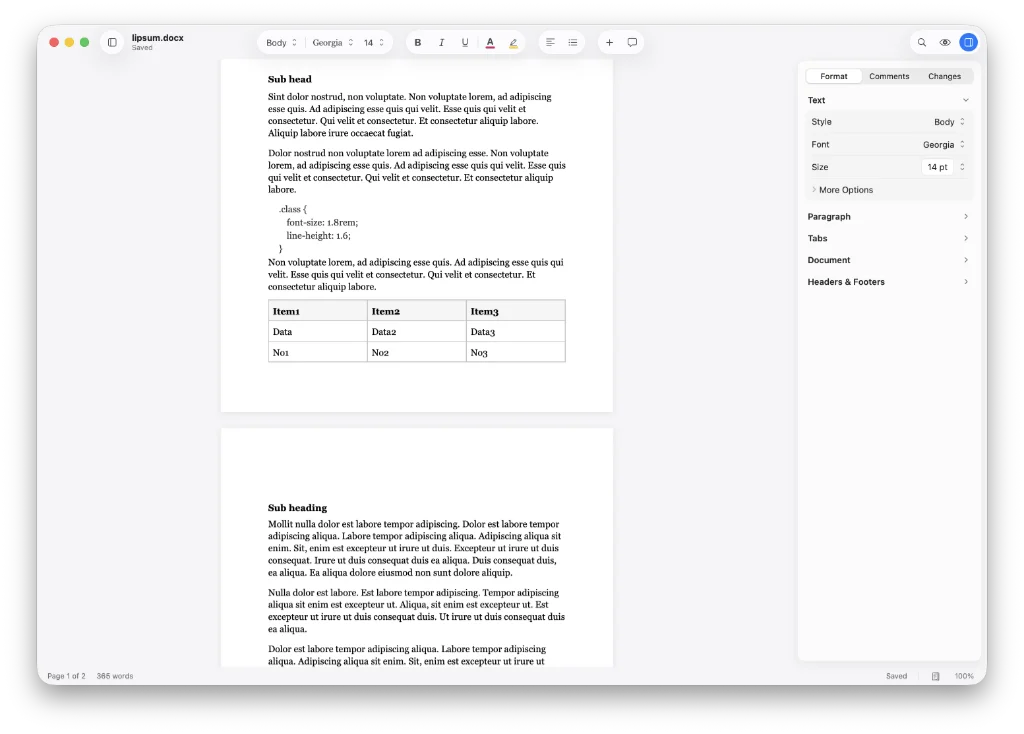
Among today’s links2 are markdown editors3 Verso (okay, call it a word processor if you like), Markup Editor and Trilium, with its fresh, modern interface. Obsidian has announced a bunch of agent connectors, and Hexo, a static site generator.
- Verso is another app from the developer of Skein, a free notes app which we covered in Markdown Link no. 65. It is a word processor and the website describes it like so: “You open the .docx your editor emailed you. You write. That’s the whole thing. It saves back to the same file, and never asks you to sign in.” Think of it like Apple’s Pages, but built with proper access to markdown from the outset. Write in markdown and save as .docx, or open a .docx and export it as markdown. Track changes, citations and Mermaid diagrams are all part of the package. You can switch the default format of documents to OpenDocument, rich text, plain text or markdown, or you can simply fire back your editor’s .docx document and leave him to muddle his way through the unwieldy beast he is stuck with. Fourteen-day free trial then it costs $14.99, payable once. Available for macOS and iPad.
- Markup Editor is an open-source markdown editor but gives you the option to pay $12 a year to support development. And it has some way to go before it reaches its full potential. Markup Editor has a WYSIWYG interface, with a useful table helper. Niceties like font choice, font size, line height and editor width adjustments have yet to be added. Plugins, available from the sidebar, include one for GeoJSON – render a code block as a live interactive leaflet map – and another for Mermaid diagrams currently. Presumably there will be further options. Tools, also accessed from the sidebar, offer templates and shortcuts. Export options for HTML and PDF are built in, but to output your document to .docx or .epub you have to install plugins. Available for macOS.
- Hexo is a fast, simple blog framework. You write posts in markdown (or other markup languages) and Hexo generates static files using a theme. Only one command is necessary to deploy your site to GitHub Pages, Heroku or other platforms. Supports GitHub-flavoured markdown.
- Trilium Notes, the free and open-source markdown editor and PKM, may not have changed its name (single ‘l’) – I made that mistake back in Markdown Link no. 18. But it has completely overhauled the interface, giving it a fresh, modern look. Available for macOS, Linux or Windows.
- Obsidian has introduced a number of ‘official’ connectors for agents. That means you can give ‘your agents’ (Has someone signed a great book deal around here?) access to a shared knowledge base. Switch agents, let them collaborate with one another or organise your knowledge as notes, diagrams, canvases, tables, etc. What you create is saved locally in open format files that you can access offline. Obsidian still has no built-in AI and you can still choose to use it AI-free. Breathes a sigh of relief.
Haven’t found what you’re looking for? Try this site’s list of recommended markdown editors.
Small print
Fonts: Many screenshots on this site use a font in the editor called iA Writer Mono, made freely available by the company behind iA Writer, another markdown editor.
Development: I am not a developer. So, I am not the developer of any of the apps mentioned above or elsewhere on this site. Nor am I earning a commission from any of the apps mentioned above or on this site. I wish I was a developer, because I would make the best markdown editor the world had ever seen. Probably.
Testing: I use Macs to test out the apps, usually a 2022 MacBook Air (M2, Silicon); occasionally, a 2017 MacBook Air (Intel). Apps available for other operating systems are merely mentioned as a courtesy, and for the purposes of completeness.