The Markdown Link no. 65
Links to the best markdown editors, static site generators, CMS’s, and markdown viewers
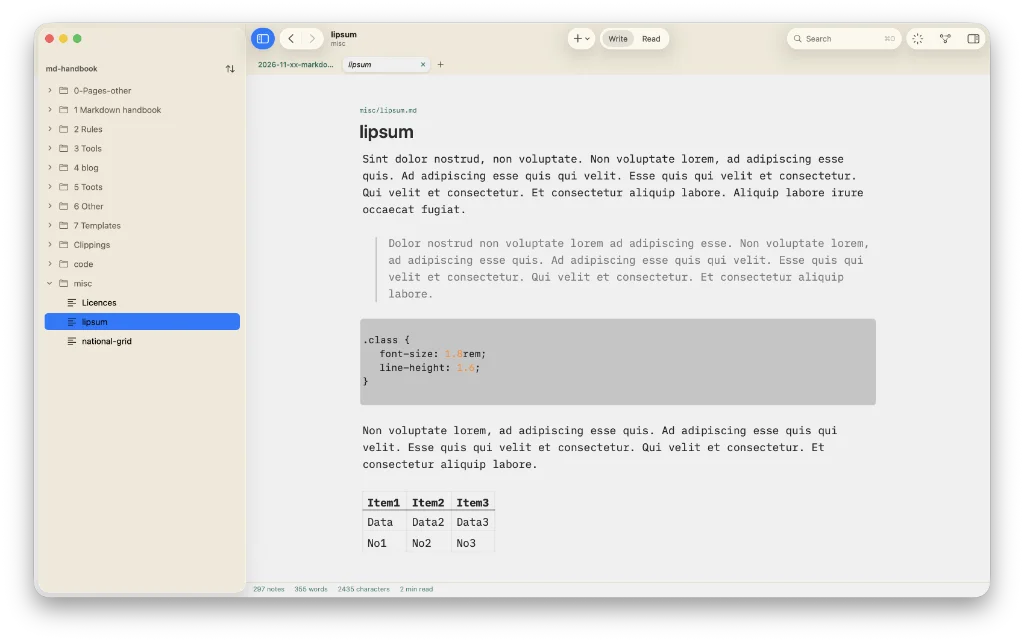
Among today’s links1,2 are markdown editors3 Skein and bpad (browser-based). The other link takes you to SideSchedule, a calendar for your meeting notes.
- Skein is a markdown editor, but one that doesn’t entertain AI. “‘No data ever leaves your Mac’ and ‘AI’ cannot both be true,” says Skein’s developer. Use it to write a book, a thesis or a case file. Chapters, sources, people and places become notes that know about each other, backlinks show what references what, and any PDFs you are quoting open beside the draft. Alternatively, point Skein at a folder of markdown notes and wiki links, tags, front matter, callouts and
.canvasboards read as they are. There is a decent choice of fonts (by which I mean it includes my preferred writing font, iA Writer Mono S), and you can adjust the size and line height to your preference. The latter of a fashion, the choice being compact, normal and comfortable. It is a similar story with line length, with the options being narrow, standard, wide or full window. There is a table helper that rids you of the need to type out all those pipes. The formatting menu is available with a right-click and you can bring up the command palette with ⌘⌥P. Two small grievances: inline code, while working, doesn’t look good; and you cannot navigate between tabs, nor pin them. I have pointed out both issues to Skein’s developer, so expect a resolution soon. Skein’s developer has this to say about why the app is free: “[It] is the advert. If Skein earns a place on your Mac, one day you might wonder whether the same care went into a word processor and a spreadsheet, and those two are how I pay for [Skein].” Export to PDF, HTML and markdown. Available for macOS and iOS. - SideSchedule is a calendar app for your meeting notes. It works by faking the Dock’s reserved strip with one Accessibility permission, then writes every meeting note into an Obsidian-ready folder. In other words, any markdown note app that has access to that folder can read your meeting notes. SideSchedule offers a 14-day free trial, following which it costs 12.99 euros. Available for macOS.
- bpad is a web-based markdown editor. It is part of a suite of tools called bstack that includes bdrop, bsend, bqrc, bsend, bpixel and bmeet. Sign in via Google or email, but it isn’t necessary to sign in if all you need is quick access to a markdown tool. Access to sharing requires a bstack account. Export is to PDF, plain text, markdown or
.docxand import acts on the same files. You are limited to three free notes with the free account, unlimited with the pro version, which costs $5 per month. Available everywhere.
Haven’t found what you’re looking for? Try this site’s list of recommended markdown editors.
Small print
Fonts: Many screenshots on this site use a font in the editor called iA Writer Mono, made freely available by the company behind iA Writer, another markdown editor.
Development: I am not a developer. So, I am not the developer of any of the apps mentioned above or elsewhere on this site. Nor am I earning a commission from any of the apps mentioned above or on this site. I wish I was a developer, because I would make the best markdown editor the world had ever seen. Probably.
Testing: I use Macs to test out the apps, usually a 2022 MacBook Air (M2, Silicon); occasionally, a 2017 MacBook Air (Intel). Apps available for other operating systems are merely mentioned as a courtesy, and for the purposes of completeness.