The Markdown Link no. 62
Links to the best markdown editors, static site generators, CMS’s, and markdown viewers
An occasional post1 from The Markdown Handbook.
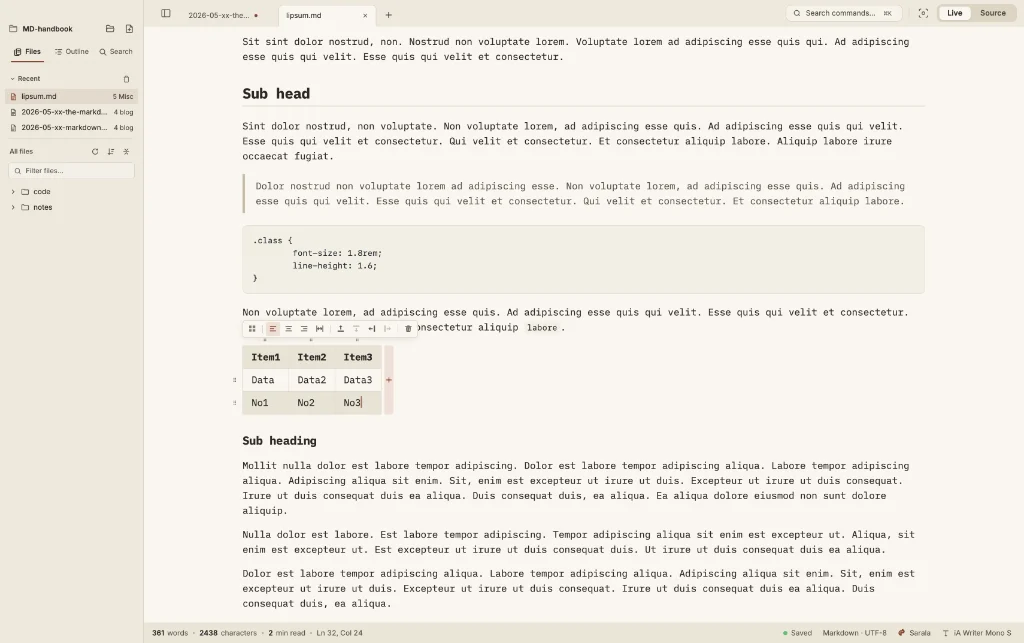
Among today’s links2 are markdown editors3 Sarala and Kolada, a small developer’s tool that formats your markdown, and Tim Abell shares a series of videos that shows his productivity method for Obsidian. There’s also news from Lodlen, which will cease operations from 19 November.
- Sarala is a free and open-source markdown editor. The commands and formatting menus are both opened using the ⌘K quick key. This also allows you access to a handy table helper, which offers a means to add a table without the need for pipe and hyphens. There’s no control over the content width other than by adjusting the size of the window, which won’t matter for some, but will if you use the app full screen. We are spoilt for choice with export options, including HTML, PDF, docx, rich text and EPUB, but excluding markdown. There is also a web version of the Sarala, which offers the same range of export choices, but this time includes markdown. I’ll leave you to work that one out. Available for macOS.
- Kolada is a markdown editor that weighs in at a mere 11.7MB, so it’s quick. In fact, it claims to be the “world’s fastest notes app”. You wouldn’t think from the size of the download that it had AI built in. But it does, Needle 2 by Cactus Compute, which runs as a 14MB binary in 28MB of session RAM. AI is optional, as Kolada allows you to turn ‘writing help off’ in settings if you don’t want any help from AI. BEAM is another feature that allows you to connect via Bluetooth: copy on one device, paste on another and your notes are the same on all of them. Control-click reveals the formatting menu and ⌘P opens the command meu in the sidebar. It has a compact way with settings, all in a single, untabbed window. Export as markdown, PDF or HTML. Kolada doesn’t mention anywhere whether it’s free or not. The app remains in beta for now, so you can download Kolada and give it a spin. Available for macOS, Linux, Windows or iOS.
- Markdown formatter is a small developer tool that runs in your browser and allows you to paste markdown, format it, check its structure and get the HTML. Nothing leaves your browser, and there’s no account, telemetry or ads.
- Tim Abell has created a video walkthrough of his Obsidian/markdown productivity methodology, which he shares with us on Youtube. It’s worth checking out; even if you don’t choose to adopt his system, you may find some useful tips.
- It appears Lodlen, one of the apps covered in Five markdown editors that travel well, is no longer fit to travel. Users have until 19 November to download anything they may have stored in the app, after which it will become inaccessible.
Haven’t found what you’re looking for? Try this site’s list of recommended markdown editors.
Small print
Fonts: Many screenshots on this site use a font in the editor called iA Writer Mono, made freely available by the company behind iA Writer, another markdown editor.
Development: I am not a developer. So, I am not the developer of any of the apps mentioned above or elsewhere on this site. Nor am I earning a commission from any of the apps mentioned above or on this site. I wish I was a developer, because I would make the best markdown editor the world had ever seen. Probably.
Testing: I use Macs to test out the apps, usually a 2022 Macbook Air (M2, Silicon); occasionally, a 2017 Macbook Air (Intel). Apps available for other operating systems are merely mentioned as a courtesy, and for the purposes of completeness.