The Markdown Link no. 51
Links to the best markdown editors, static site generators, CMS’s, and markdown viewers and readers
An occasional post1 from The Markdown Handbook.
Among today’s links2 are markdown editors3 Paper, Writer, Wander, Nodes and Notes Better.
- Paper, not to be confused with Paper, Paper or Paper (someone, please, help the developers come up with a unique name), is similar to releases of iA Writer before version 4 when it added support for tables. By which I mean, Paper doesn’t do tables, but then if you write a lot of essays, I guess you don’t either. The developer recognises that. They have not gone for the usual all-embracing approach, instead, looking to attract the long-form writers among you. Preview, Typewriter and Focus modes all require Pro so I can’t comment. The monthly fee to sign up for the Pro model is $29.99 and the annual charge is $99.99, with no lifetime licence offered. I have to say these charges for what is simply a software solution to pen and paper are laughable when you consider the range of other options out there. Available for macOS and iOS.
- Writer is a lightweight markdown editor aimed at developers, students and power users. It combines Vim motions (disable in
Settingsif you prefer) with modern development tools. Tables are designed to save you time. So no more pipes and hyphens, although they remain visible in the editor. Daily notes offer a number of ready-built templates (⌥T), but no way to create your own. This feature is aimed at developers; maybe that’s why. There are slash (/) commands and terminal view is a mere keystroke away. Other features include canvas, kanban and a spreadsheet. Export is to PDF only. Available for macOS and Linux. - I neglected to mention Wander’s iOS app when I covered the macOS app in Markdown Link no. 44. It can be a useful backup to have around when Obsidian is misbehaving, especially when you simply want to make a minor edit or add a quick note on mobile. Pointed at the same vault it works a treat. Plus it’s free.
- Nodes is a minimalist, single-pane editor for the Mac. “Every note is a node, every link is an edge” appears to be tethered to the idea of creating pretty maps. If that’s your thing, then go grab it. I’d say it’s also confusing to be talking about notes as ‘nodes’ and links as ‘edges’. Also questionable is the rather childish approach to collecting ‘stickers’, whose very presence in a serious writing tool beggars belief. Maybe we aren’t supposed to take Nodes seriously. Import or export your notes whole folders at a time (premium). There’s a demo with 16 nodes (notes) or $12.99 buys you access to your library with no cap and $17.99 gets everything plus the agent. Available for macOS.
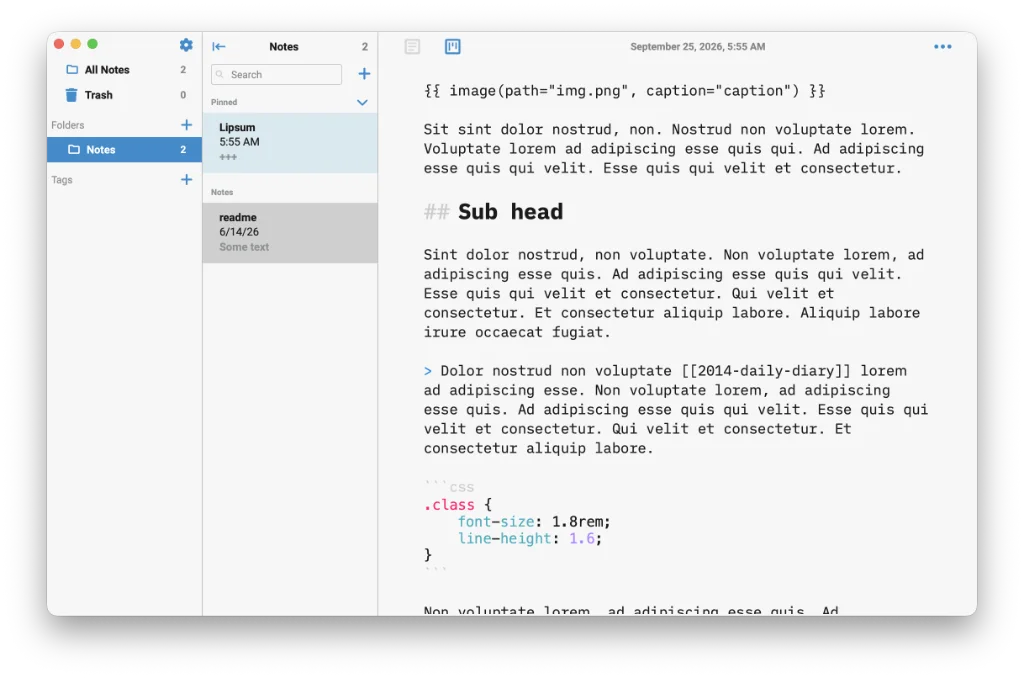
- Notes Better is an open-source, database-driven markdown editor. Settings are limited and tucked away in the three dots, top right. The limited settings is not a bad thing, as you can feel overwhelmed. There are three themes: dark, light and sepia. But wiki links don’t work and tasks is a premium offering, so I can’t comment on the workings of the app overall. $14.99 gets you a lifetime licence, which transforms your tasks board from read-only to editable and gives you access to all future pro features. Export is to markdown and plain text. Available for macOS, Linux and Windows.
Haven’t found what you’re looking for? Try this site’s list of recommended markdown editors.
Small print
Fonts: Many screenshots on this site use a font in the editor called iA Writer Mono, made freely available by the company behind iA Writer, another markdown editor.
Development: I am not a developer. So, I am not the developer of any of the apps mentioned above or elsewhere on this site. Nor am I earning a commission from any of the apps mentioned above or on this site. I wish I was a developer, because I would make the best markdown editor the world had ever seen. Probably.
Testing: I use Macs to test out the apps, usually a 2022 Macbook Air (M2, Silicon); occasionally, a 2017 Macbook Air (Intel). Apps available for other operating systems are merely mentioned as a courtesy, and for the purposes of completeness.