The Markdown Link no. 37
Links that attracted my attention recently
An occasional post1 from The Markdown Handbook.
Among today’s links2 are markdown editors3 Bear, Scratch and Supernotes. There are also links to the web-based Tables Generator and Kept, an app that captures all your chats with a number of LLM providers.
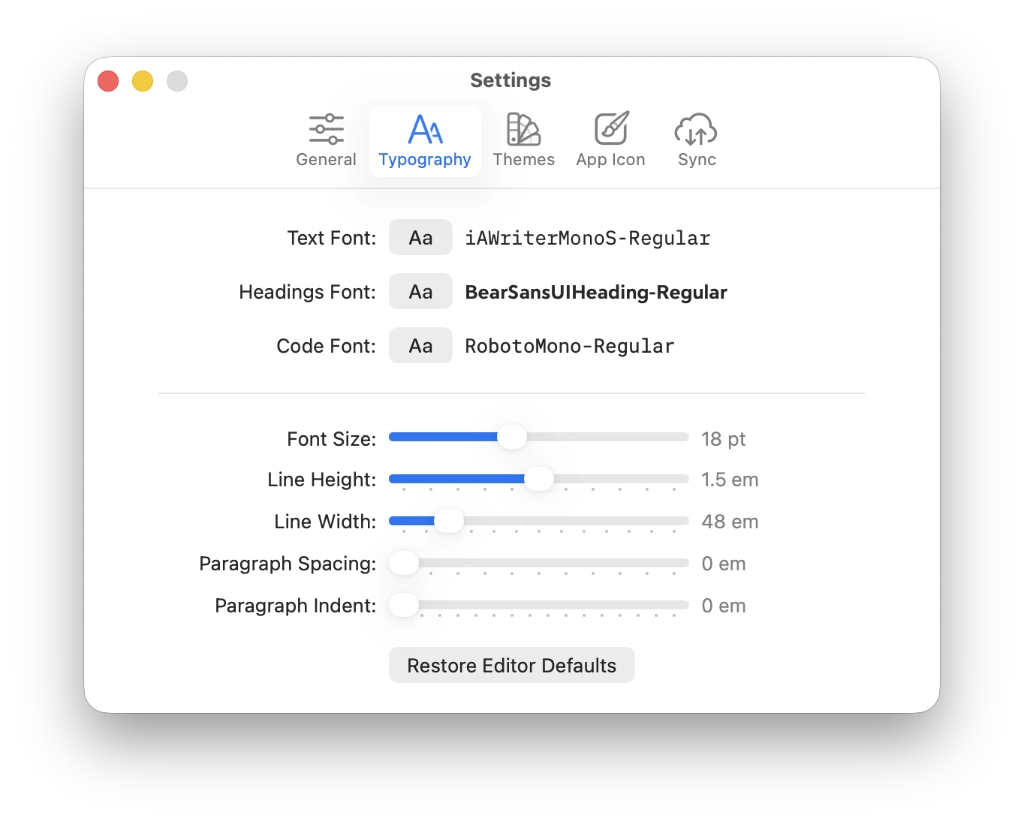
- Bear was one of those apps I liked, until something better came along. (That something would prove to be Obsidian.) What I didn’t like about Bear was the subscription model you had to sign up to in order to sync to iCloud, a service I already paid for. You may think that I was just jumping from one subscription model to another – Ulysses to Bear – but, to my mind, it was just the way the world was going; the subscription model was here to stay and I’d better get used to it if I wanted a decent editor. But the subscription model was, and is, doomed. There are too many good apps out there that offer lifetime licences, and even more that are free. All that said, Bear is an elegant markdown editor. You only have to look at the preferences (image below) to see what I mean. Font choice, font-size, line-height and editor width are all covered. At least paying the subscription, allowed me to move all the markdown documents I had accumulated ready for my next editor. Fickle people us markdown users.
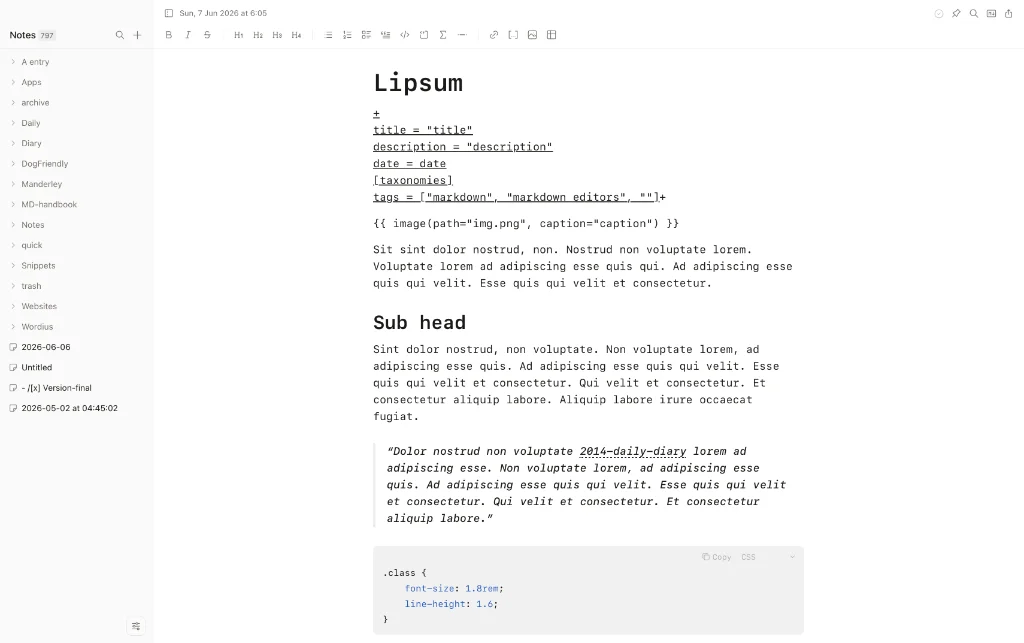
- Scratch is a free, open-source offline markdown editor, or scratchpad, for capturing quick thoughts, todos, ideas and writing extended articles. It is keyboard-optimised and AI-compatible, with no cloud, no accounts and no subscriptions. Scratch has wikilinks – import a vault from Obsidian, for instance, and they continue to work – and slash commands. Font size, line-height and editor width are all adjustable in preferences, although font choices are limited to sans, serif and mono. Imported documents are, annoyingly, named by the first line of the document, yet the filename remains hidden. Create a new document and it gets whatever name you give it. Figure that one out if you can. Copy as plain text, markdown or html, print as PDF and export as markdown, Scratch does all the heavy lifting. Git integration is optional, as is AI support. Scratch is that good it has been added to this site’s list of recommended markdown editors, despite the minor issue of file naming. Available for macOS, Linux and Windows.
- Supernotes claims to be a new home for your ideas, records, tasks and lists. There is a delay while it handles all your data – data that it asks for – then the app is up and running after a lengthy onboarding process. Next you’re asked to stump up, wait for it, £8 a month, £72 a year or £192 for four years, all without a trial. There is a free option, it’s just hidden away. (After jumping between the downloaded app and the browser, you eventually find it.) If this is what they call ‘sustainable app development’, then I want no part of it. Besides which, it is staggeringly slow, hesitating to open/close sidebars – before you have added any notes – and offering users no choice over the look of the desktop app, or web wrapper, whatever. All this is even before switching on its ‘AI Superpowers’. I was wondering why the download was so big at 1.27GB.
- Tables Generator is a web-based solution for those who have a lot of markdown tables to create, or anyone who simply can’t face creating another markdown table. It is the alternative I mentioned during my coverage of Tableflip in The Markdown Link no 36. Tables Generator uses a simple framework to build tables in markdown, LaTeX, text, html and wiki formats.
- Kept captures conversations from popular LLM providers and writes them to your filesystem as plain markdown. There’s one file per conversation, indexed across supported providers. Kept ships an MCP server, so any MCP-savvy client can read, write, and search your vault. Simply download the desktop app, sideload the extension, type
@keptin a chat. The vault writes to your home directory; nothing else needs to be set up.
Haven’t found what you’re looking for? Try this site’s list of recommended markdown editors.
Markdown news
- CSV to Markdown is a tool that does as its name suggests, converts your raw CSV files into presentable tables written in markdown format. If you’re a spreadsheet person that’s one less pain resolved.
- Segmark’s developer has created a new flavour of markdown – as if we needed another. The app is a markdown reader and ebook engine written in Rust that parses an extended flavour of markdown. It reads single .md files as well as .mdeb ebooks – a folder-based ebook format where chapters are individual markdown files, organised into sub folders and described by metadata.md front matter.
Small print
Fonts: Many screenshots on this site use a font in the editor called iA Writer Mono, made freely available by the company behind iA Writer, another markdown editor.
Development: I am not a developer. So, I am not the developer of any of the apps mentioned above or elsewhere on this site. Nor am I earning a commission from any of the apps mentioned above or on this site. I wish I was a developer, because I would make the best markdown editor the world has ever seen. Probably.
Testing: I use Macs to test out the apps, usually a 2022 Macbook Air (M2, Silicon); occasionally, but rarely, a 2017 Macbook Air (Intel). Apps available for other operating systems are merely mentioned as a courtesy, and for the purposes of completeness.