I used AI to make a notes app, so you don’t have to
What follows is an experiment, using AI to create a notes app or markdown editor. It’s an experiment, that’s all
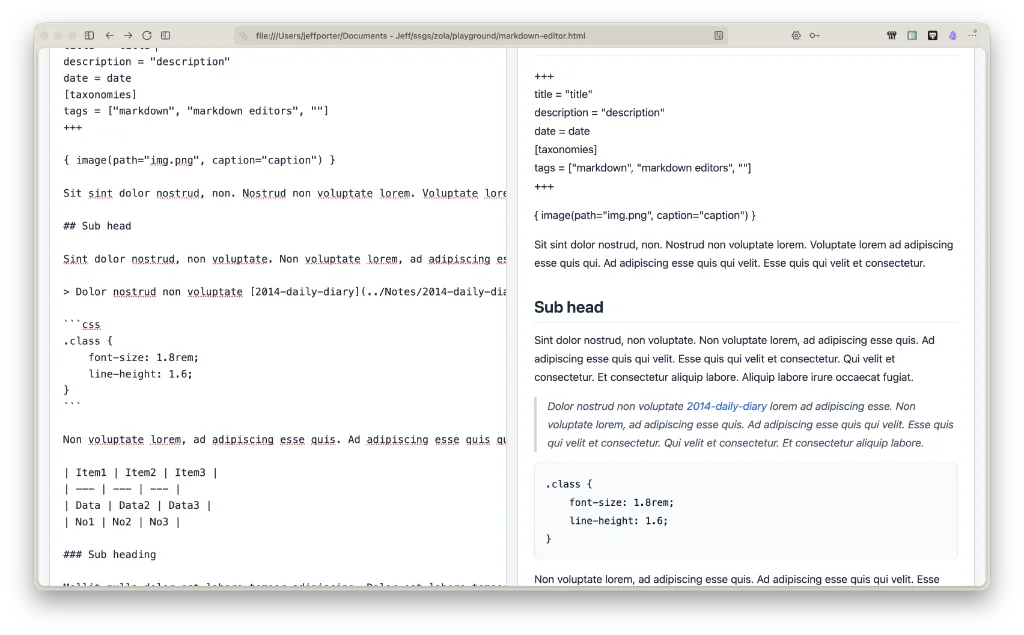
How hard can it be to build a markdown editor, I thought? As it turned out, in this day and age, not difficult at all.
I was fed up with seeing all those posts on Reddit and elsewhere that said “I made a markdown editor to suit my needs, maybe it suits ur’s too”. So I came up with a cunning plan. Make my own. How hard can it be?
My instruction to DeepSeek on on my iPhone was simple: “Make a markdown editor”. That was it: four words.
It came up with this… In five seconds.
And no tokens, bitcoins or other strange gifts exchanged hands.
Markdown Editor, as I’m calling it, comprises a single HTML file.
The file contains everything necessary for a working, dual-pane editor. Once opened in your browser, the text on the left is editable, with the preview on the right. As long as you know a bit of markdown, you’re good to go. It doesn’t save your files, import or export them, or anything like that, and there’s no documentation. It is also not packaged like an app. All it is is a simple HTML file. An experiment.
It just works.
Now, I could give it a funky name, tart up its looks, sell it at an extortionate fee, and retire to Monaco – the home of all good developers and F1 drivers. (That’s a joke for the hard of hearing.)
There are no design niceties. It is an experiment, that’s all. Take it or leave it.
Download Markdown Editor to see how it works. All the download contains is a zipped HTML file, which can be opened in any browser. Unzip it, take the HTML file apart, separate out the CSS and JS into individual files; do what you want. Even create your own editor using this as the basis.
I am not a developer, I’m a journalist, and I’m happy with that.
Download: Markdown Editor
Haven’t found what you’re looking for? Try this site’s list of recommended markdown editors.
Small print
Fonts: Many screenshots on this site use a font in the editor called iA Writer Mono, made freely available by the company behind iA Writer, another markdown editor.
Development: I am not a developer. So, I am not the developer of any of the apps mentioned above or elsewhere on this site. Nor am I earning a commission from any of the apps mentioned above or on this site. I wish I was a developer, because I would make the best markdown editor the world had ever seen. Probably.
Testing: I use Macs to test out the apps, usually a 2022 Macbook Air (M2, Silicon); occasionally, a 2017 Macbook Air (Intel). Apps available for other operating systems are merely mentioned as a courtesy, and for the purposes of completeness.