Review: Writer
Links to the best markdown editors, static site generators, CMS’s, and markdown viewers
An occasional post1, 2, 3 from The Markdown Handbook.
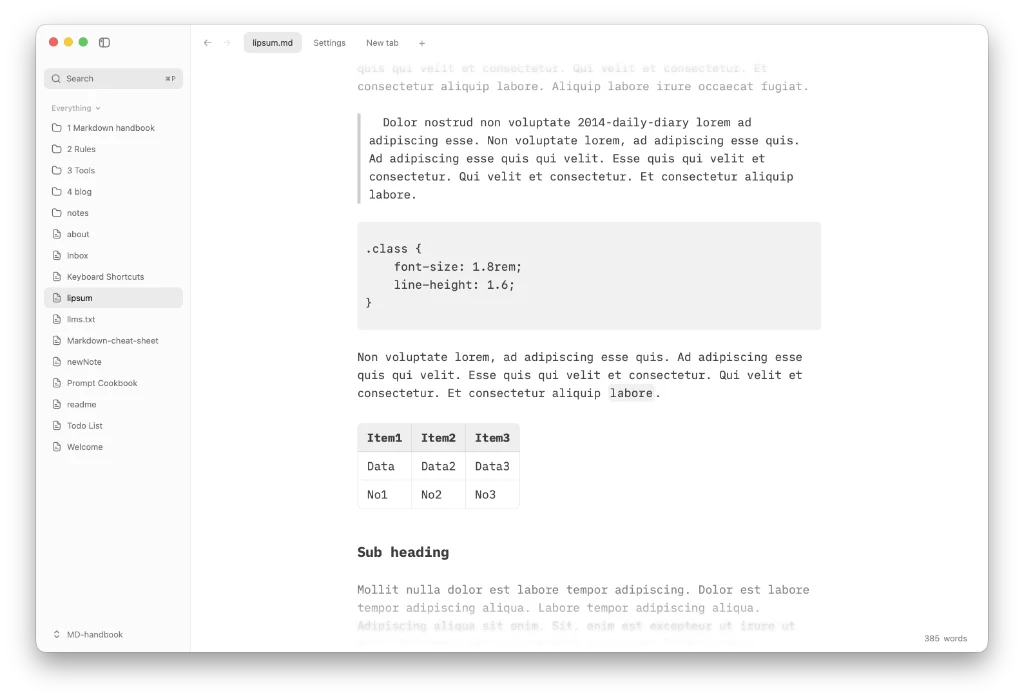
Writer is a fast, lightweight markdown editor that is free and open-source. The current release is v0.8.0.
Some of you may have come across a post on Reddit, as I did. Many of you will have given it a wide berth, seeing it as ‘yet another markdown editor’. I’m glad I didn’t.
Writer feels compact, assured and solid. You can edit an existing Obsidian vault, for instance, and, well, nothing happens. Life goes on as normal. Edits made in Obsidian are recognised in Writer, and vice versa. To be on the safe side, though, I would start with a copy of your notes, rather than an existing workflow, to be certain everything works as expected.
The developers of Writer are Joel and Claude. We all know who the latter is, even if we have never met it. Writer has been vibe-coded. But if vibe-coding can turn out an app as good as this… Well, Joel had to at least have provided some direction and oversaw the creation of Writer.
There’s no toolbar to toggle. So you need to know markdown, including the various rich-text shortcuts, such as selecting a word and hitting ⌘B or ⌘I, which turns that word into bold or italic. The basics of markdown are easy to learn. In fact, extended markdown doesn’t take up much more headroom.
There is no documentation to anyone intent on finding it. I have looked. But if you do locate it, let me know. Maybe I came across the app too early in its development, because that original Reddit post did not come from its developer.
So you may have to look around in the dark a bit to find the shortcuts.
Use ⌘P to bring up a list of commands or start typing to find a file. Similarly, in the folder tree right-clicking (control-clicking) on a note or folder brings up a list of options, such as rename or delete.
Here are a few other shortcuts I have come across:
- ⌘N to create a new note.
- ⌘O to search for notes.
- ⌘F/⌘G to find within the selected note.
- ⌘W closes the current tab.
- ⌘T for a new tab.
- ⌘K spits out a link.
- ⌘/ for a comment in a file.
- ⌘\ toggles the sidebar.
- ⌘-/⌘= to zoom in or out.
Tables get a little helping hand, but not much. If they happen to be imported, that’s fine. But otherwise you’ll have to generate them from scratch, using the usual pipes and equals signs, or, failing that, copy and paste always works.
Depending on which app you used previously, your documents may contain front matter. Writer recognises this and puts it on display, but offers no way to switch it off or, at a minimum, to fold it away.
Writer has a WYSIWGY (rich text) interface, which makes life easier. There’s no raw markdown, as far as I can tell after a brief inspection.
Mermaid diagrams are rendered using a lightweight library called Pele, originally, and as recently as last week, created for Obsidian. There’s also the option to install Writer’s command line tool from the Writer menu.
The maximum number of recent workspaces is 10. This is the default number in Settings, but if you need more adjust accordingly.
Telemetry is off by default, leaving it up to the user whether to share what they have been doing with the developer.
It is rare to come across a markdown editor this good. With Writer, Joel has created a simple, elegant editor. But it would be great if he could let us in a few tricks, rather than leaving us to figure them out for ourselves.
Haven’t found what you’re looking for? Try this site’s list of recommended markdown editors.
Small print
Fonts: Many screenshots on this site use a font in the editor called iA Writer Mono, made freely available by the company behind iA Writer, another markdown editor.
Development: I am not a developer. So, I am not the developer of any of the apps mentioned above or elsewhere on this site. Nor am I earning a commission from any of the apps mentioned above or on this site. I wish I was a developer, because I would make the best markdown editor the world had ever seen. Probably.
Testing: I use Macs to test out the apps, usually a 2022 Macbook Air (M2, Silicon); occasionally, a 2017 Macbook Air (Intel). Apps available for other operating systems are merely mentioned as a courtesy, and for the purposes of completeness.