Review: Plainva
Plainva is a markdown editor, but it does much more than that, bringing your notes, tasks, calendar and email under one roof
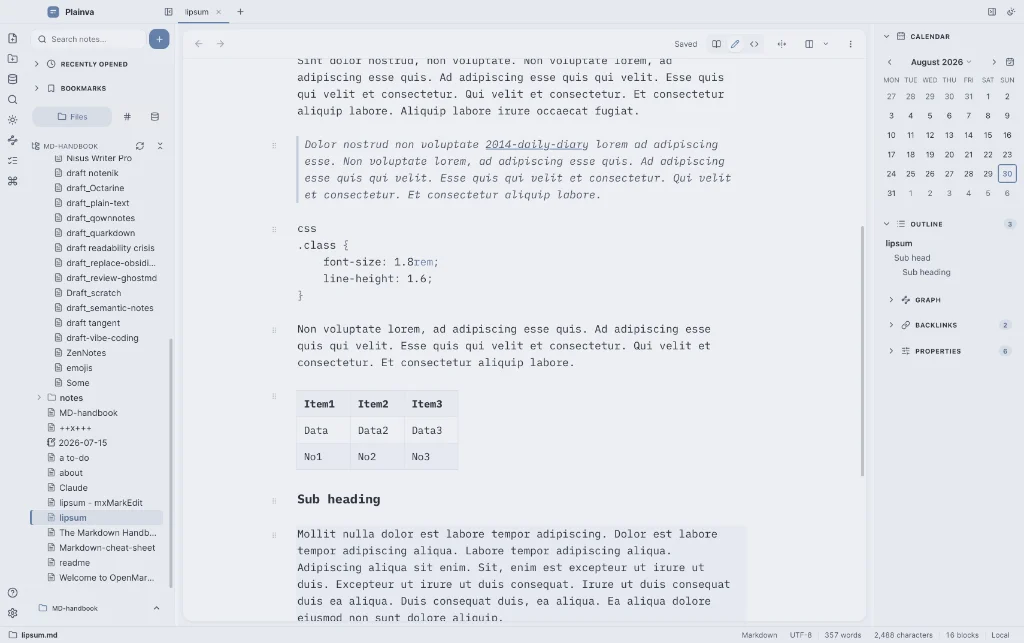
Plainva does markdown, with wiki links and call outs, etc. It has a daily note set up; it has bases; it handles tasks. It does sync for free using your own set-up.
It also has a calendar, which allows you to sign-in to your provider, whether that be iCloud, Google, or anything with CALDAV support. And it has email, which allows you to sign in to your email network, whether that be Mailbox, Apple, Google, or pretty much anyone else.
What Plainva doesn’t do is walk your dog; I’m sure there is an Obsidian plugin that can help you there, though. I jest, of course, but you get my meaning. Obsidian is overweight and overburdened, weighed down, as it is, by its own plugin ecosystem. It’s also closed source, leaving it open to its developers taking it down whichever path they chose. Whether you like it or not.
Plainva, on the other hand, is free and open source. And despite mixing up four apps in one – editor, calendar, tasks and email – this editor remains blazingly quick. Even switching vaults is almost instant.
Developer Marco Karmmadt has produced a markdown editor that combines Notion with Obsidian, without the aid of plugins, and it’s fast, believe me, whether you have tens of thousands of notes or a handful.
And imagine the time you save on context-switching: notes, tasks, emails, calendar all in separate apps. With Plainva, you don’t have to do any of that. Notes, tasks, emails, calendar all live in the same app.
Markdown editor
Let’s consider the crucial aspect of Plainva as a note-taking app.
What Plainva’s developer has done here is very clever, producing a local-first markdown editor that opens your existing Obsidian vaults (folders), adds Notion-style databases over the plain notes (bases), and syncs through storage you already own.
There’s a choice of syncing to WebDAV, Google Drive, OneDrive, Dropbox or S3. You can also open and backup a vault directly from iCloud.
All of which means, he has joined Obsidian’s gift for note-taking with Notion’s database styles so you can filter your notes, much as you would in a spreadsheet. For example, you could check against a ‘Published’ field to filter out all notes that were still ‘drafts’. But here’s the trick bit, the concept resembles Notion databases, with one key difference: your data does not live in a database, it lives in your notes. Databases can be embedded or standalone. Make that choice via the slash (/) command.
Databases also offer several views over the notes: tables, list, gallery, board, calendar, timeline and graph.
I never really understood the hype surrounding bases in Obsidian, but with Plainva I can see their usefulness. It makes using bases a lot easier, given that I didn’t even try them in Obsidian. I switched off access almost as soon a Obsidian added the feature. Maybe I’ll have to revisit that or maybe I won’t, because bases are for spreadsheet nerds and I’m not one of them.
Plainva is in beta, which means it comes with the usual list of caveats, such as don’t let it loose on a directory you care about, at least not without taking a backup. Plainva does that for you anyway, but it pays to err on the safe side.
There are shortcuts for various menus: ⌘P is like the File/View menus combined; ⌘K brings up search or switch file; and / is the formatting menu.
I like how it doesn’t display all links when a paragraph is clicked. They lie in wait till you encroach on their territory.
Wiki links and classic markdown links both work, the former by typing the usual opening brackets shortcut, [[, and there’s a handy choice offered of files to link to, which alters as you type, narrowing the field.
Plainva also has a trick up its sleeve, automating the build of index.md (a name reserved for use by Plainva), a contents file per folder that links to each file and subfolder.
There are 12 themes, including dark and light versions.
The app is notarised for Apple devices, but has yet to gain the same recognition for Windows, which is in the pipeline I have been informed.
Tasks and calendar
Tasks live in your notes, but are also automatically added to your databases and calendar (if they happen to be scheduled). Tasks are added using the usual syntax, - [ ].
If you’re in the habit of journalling, whether through daily notes or some other means, Plainva allows that too. Ctrl-click in the calendar (displayed in the right-hand sidebar) to either open the calendar or create a daily note.
The right-hand sidebar is also the place to look for outlines, backlinks, databases or graph views, depending what is being displayed in the editor window.
If you like the idea of sending your communications in markdown – and why shouldn’t you – then go ahead and set it up. I did and it works a treat, offering multiple email addresses and aliases, and, most important, tailoring those aliases with signatures, something that took Apple a long time to grasp.
Saving an email as a note or task can save you a tremendous amount of time.
In my communications with Marco Karmmadt, Plainva’s developer, I sensed a level of maturity. Whether he’s young or old is beside the point, but his attitude wasn’t like many of the young ‘developers’ you come across on Mastodon, Reddit or elsewhere, who are keen for you to observe their latest app: “I built a markdown editor in 24 hours. Take a look…” For the most part their output is AI-assisted, of course, as are most of their answers to any questions you may have. The fact that Karmmadt has made the app free and open source speaks volumes. It shows he understands what we all want: an Obsidian-like app but with open source credentials. More than that it is free. He leaves it up to you as to whether you want to contribute.
Plainva weighs 68MB on disk and in use, making it fast. Compare that with Obsidian’s mammoth 498MB in use – with no plugins installed – that’s a big difference.
The future for Plainva
I asked the developer whether there was likely to be any AI included (not that I want it to be). His response: “[There is] no built-in AI today. The plan is to make Plainva AI-capable at some point, but strictly as an optional add-on – never built in, never forced on anyone who doesn’t want it.” That’s the way I like it.
And for those of you who like to look under the bonnet before making a decision, Plainva’s documents might be worth a look.
Website: plainva.com