Review: Koona Pin
A bookmark manager that allows you to concentrate on reading an article without all the clutter
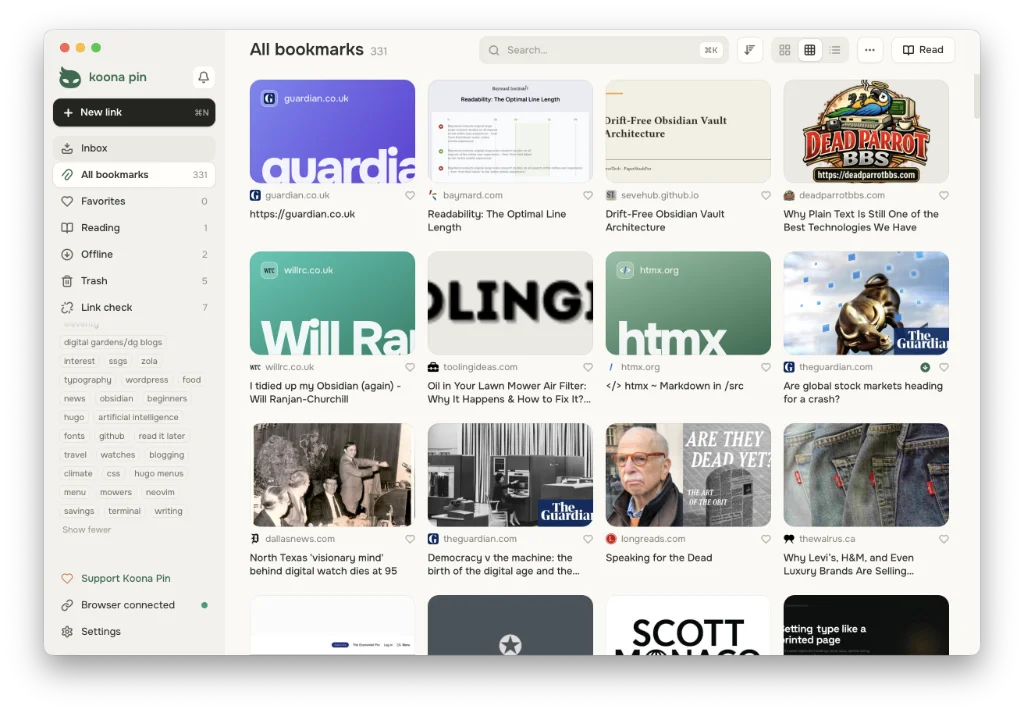
Koona Pin has nothing to do with markdown, you would think. It is a bookmark manager for macOS1,2,3, but it’s a useful tool to have around if you have a lot of research to do and are looking for somewhere to store links.
There’s further relevance in its sister app Ko Notes, currently in development, which is a markdown editor.
Use it to save links to articles from across the web, whether you’re in Safari, Firefox, Chrome or Edge. The app has a web clipper available for each browser.
Click the web clipper for any article you happen to stumble upon and it is saved to your inbox. Select its card and choose a category to store it in for future reference. Alternatively, create a new category. Grouping articles can also be done via a tag.
Sort new links one card at a time and read the articles you have saved without clutter, such as ads appearing everywhere and other reminders popping up to distract you. Note that the scripts used on various sites can get in the way of some articles you try to save; so, while it is still saved to Koona Pin, your only outlet is to read those articles in the browser. Blame the site, not Koona Pin. You can also follow sites through their feeds.
Import bookmarks exported from your current reader as an HTML file. Koona Pin also imports feeds by extracting them from an OPML file.
Koona Pin is free and open-source, but priced at $1.49 if you want to show support for the developer. You can also buy a subscription (priced at $1.49 per month or $9.99 a year) if you your reading is spread across multiple computers.
Available for macOS, Linux, Windows and Android.
Website: Koona Pin
Haven’t found what you’re looking for? Try this site’s list of recommended markdown editors.
Small print
Fonts: Many screenshots on this site use a font in the editor called iA Writer Mono, made freely available by the company behind iA Writer, another markdown editor.
Development: I am not a developer. So, I am not the developer of any of the apps mentioned above or elsewhere on this site. Nor am I earning a commission from any of the apps mentioned above or on this site. I wish I was a developer, because I would make the best markdown editor the world had ever seen. Probably.
Testing: I use Macs to test out the apps, usually a 2022 Macbook Air (M2, Silicon); occasionally, a 2017 Macbook Air (Intel). Apps available for other operating systems are merely mentioned as a courtesy, and for the purposes of completeness.