Review: Cogito
Cogito is a markdown editor with outstanding social connections and AI superpowers if you need them
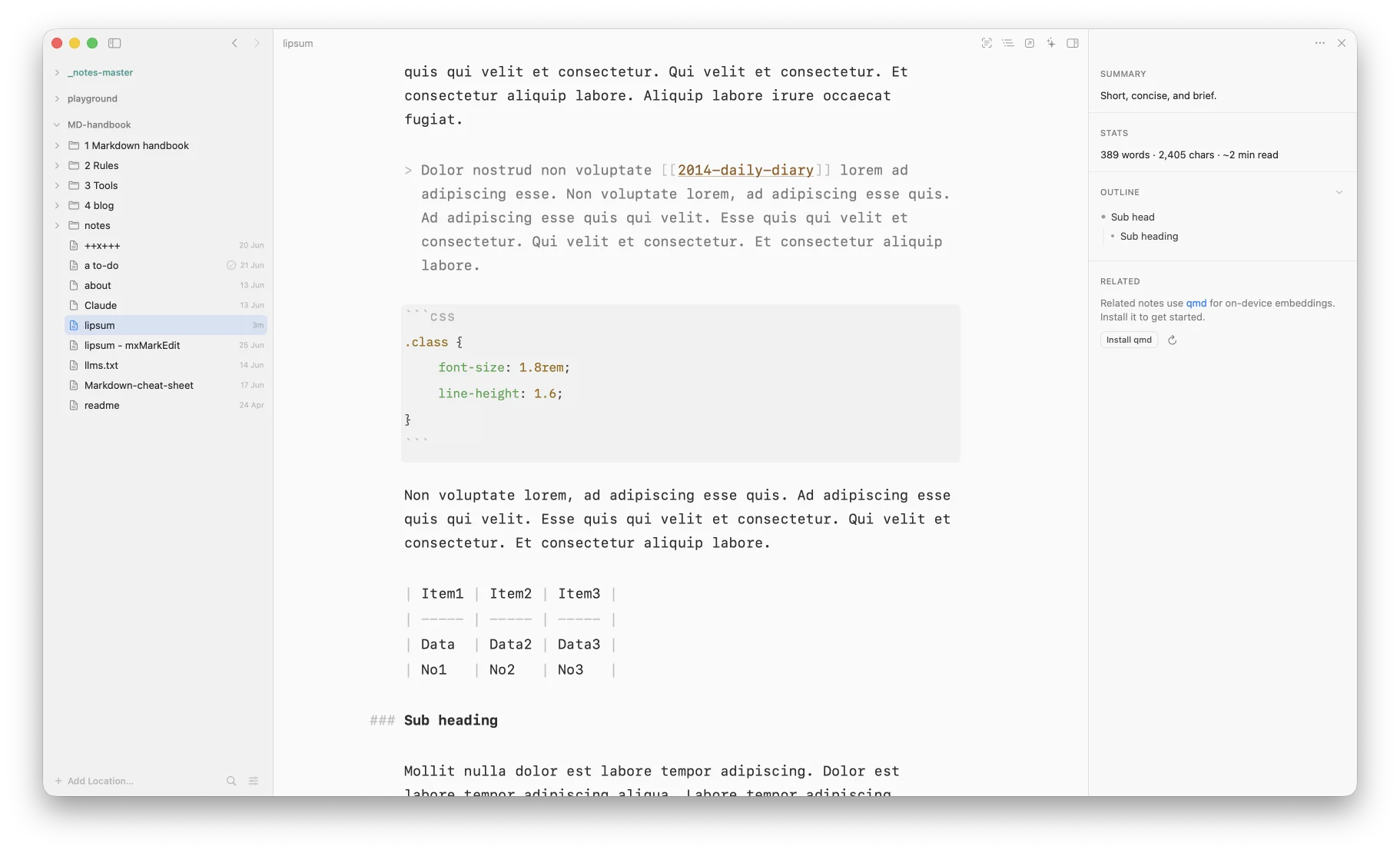
From the moment you start up Cogito, you know you’re in for something extraordinary. And there it is, it’s a markdown editor in the true sense of the word. There’s no toolbar. You’re all alone, and can get on with the task at hand, writing, adding your own shortcuts and syntax to bold, italicise and otherwise electrify your notes.
Cogito is what’s known as a native markdown editor, an application designed to integrate seamlessly into macOS without the need for additional plugins or third-party tools, unlike Obsidian. It does rely upon one external tool, qmd, a piece of software that allows you to show related notes. But qmd’s not downloaded as a constituent part of Cogito. The developer allows you to decide whether you need it. Personally, I don’t have a knowledge base, so I don’t need this extra refinement to locate notes.
It’s a similar story with AI. You don’t have to turn it on if you don’t want to. But it’s there if you need it.
When you launch Cogito for the first time, the opening screen asks you to add a folder that follows Obsidian’s guidelines for sorting files. Assuming you have Obsidian, that is; otherwise, you simply choose a folder to locate your files. Further locations can be added via ‘Add location’ at the foot of the sidebar or by dragging and dropping folders. Add location can be useful, for instance, if you have various sets of notes that you like to keep separate but want to access from time to time.
It has everything most people want of a markdown editor – wikilinks, checkable tasks, tables, math and Mermaid diagrams. In addition, there are callouts, similar to Obsidian, and definition lists.
As for writing, Cogito has everything you’d expect of a modern markdown editor, from drag-and-drop inline images to dimmed syntax so your prose stands out. In addition, there are shortcuts for bold, italic, links, tasks plus many more and smart lists with auto-renumbering. The typography is obviously carefully done, but I’m in no doubt it would be better if opened up to available fonts on your system.
Your entire workspace is always within reach, no matter how many files you have. Quick open (⌘P) gives you access to a list of files, open files in tabs, add favourites, pinned notes and folders, drag-and-drop to reorganise your files and folders in the sidebar.
The fast, native editor is paired with a preview. It offers synced source and preview scrolling, syntax highlighting for 20+ languages, instant rendering, even on large files, plus tables, Mermaid diagrams, math and more.
The Inspector, which lives in the right sidebar, adds a live outline, writing stats, task progress, and related notes. Related notes can use both explicit links – part of Cogito’s link graph – and on-device semantic search powered by qmd (see above). Explicit links are notes that link to this one, notes this note links to, and notes that link to many of the same places.
Open the Inspector sidebar to understand any document at a glance. There’s an AI-generated summary of the document, word count, characters and reading time, task completion tracking and a live document outline.
Cogito is pumped for AI, but doesn’t have to be used that way. It measures 36.5MB on the download scale, so I’d warrant it isn’t. Instead its AI-developed summaries of documents arrive via Apple Intelligence. I would be happy to switch them off, but find them quite useful to refresh my memory of a note’s contents.
Access to AI is turned on via Claude Code, Codex, Gemini, Amp and Open Code in settings. Permissions are also controlled in settings, offering read-only, edits and full access. I have left all these well alone for the purposes of this review.
Cogito connects with Typefully, an app by the same developer, for social media posting. It allows you to post notes to Mastodon, Twitter, Bluesky, Threads and LinkedIn. Add Reddit, Piefed and Hacker News and I’m sold, but having access to Mastodon makes for a good start.
A handful of tweaks
Four suggestions I think would improve Cogito:
- Font choices: could be a bit more relaxed/open to your system. (I only ask this because I prefer to edit in IA Writer Mono S, so it’s purely selfish. Otherwise the font choice is good.)
- A split editor, whereby the document you are working on is opened with another document for reference/research side by side, similar to Obsidian.
- It would be a nice touch if the AI sidebar icon, top right, only appeared if you had enabled AI in the settings.
- When you delete a document it leaves a blank ‘untitled’ document in the sidebar.
As for the developer struggling to set a price, I have a suggestion: $34.99 for a lifetime licence, with reduced charges made for major releases. Markdown for the masses, rather than the select few who can either afford the subscription, their parents can afford the subscription, or their companies’ can afford the subscription. This would put Cogito in the mid tier of markdown editors, which it certainly isn’t, but also makes it competitive, which it most certainly would be. If he chooses to go down the subscription route, then he’s on his own.
Not what you’re looking for? Try this site’s list of recommended markdown editors.
Small print
Fonts: Many screenshots on this site use a font in the editor called iA Writer Mono, made freely available by the company behind iA Writer, another markdown editor.
Development: I am not a developer. So, I am not the developer of any of the apps mentioned above or elsewhere on this site. Nor am I earning a commission from any of the apps mentioned above or on this site. I wish I was a developer, because I would make the best markdown editor the world had ever seen. Probably.
Testing: I use Macs to test out the apps, usually a 2022 Macbook Air (M2, Silicon); occasionally, a 2017 Macbook Air (Intel). Apps available for other operating systems are merely mentioned as a courtesy, and for the purposes of completeness.