Obsidian plugins: StoryLine
News from the world of markdown
The developer says…
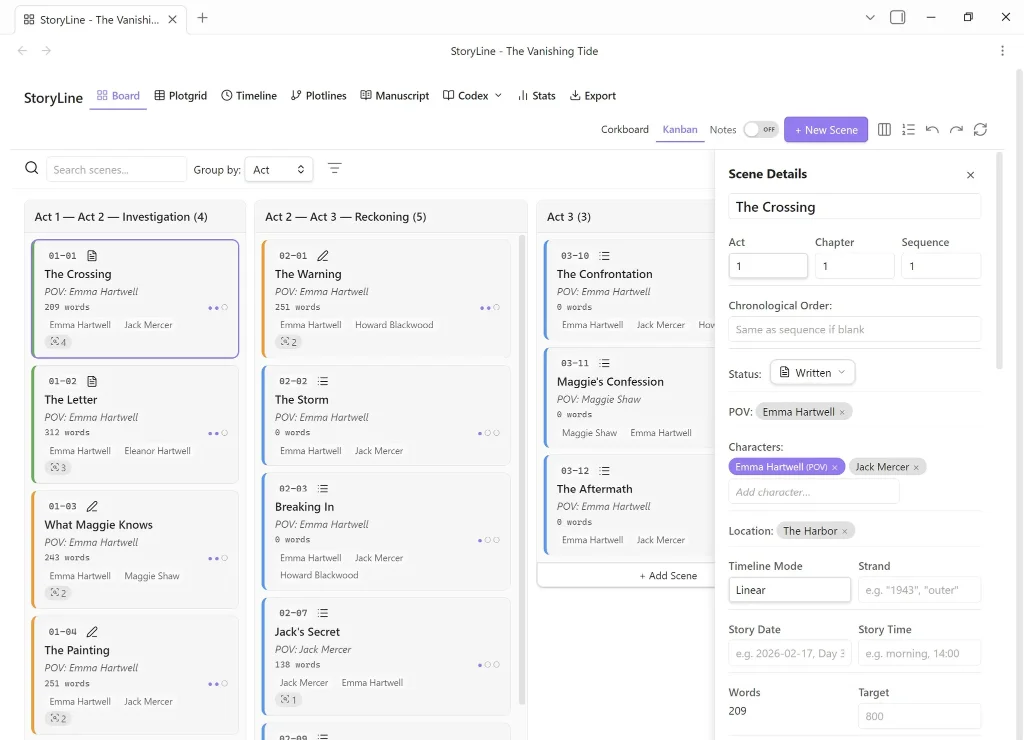
StoryLine transforms your Obsidian vault into a complete book planning and writing tool. Organise scenes, build characters, manage locations, track plotlines and monitor your progress.
Features
I am not going to list all the features here. There are far too many, but here goes for some of them:
- Scrivener: Import a
.scrivproject (from Scrivener 2 and 3) as a new StoryLine project. Attempts to convert scenes, characters, locations and research. - Custom scene fields: Define your own metadata fields on every scene (story grid functions, Truby aspects, beat-sheet labels, genre conventions, anything your method needs). Managed under
Settings > Custom Scene Fields. - Codex hub: A unified hub for characters, locations, and custom categories. Each category gets its own folder, search and detail pages.
- Codex linking: Associate Codex entries with scenes via tag-pill inputs in the inspector and right-click assignment from detected links.
- Manuscript view: Scrivenings-style continuous document with embedded live preview editors. Read and edit your whole story in one scrollable page.
- Scene management: Full metadata, six-stage status pipeline, drag-and-drop, multi-select bulk edits, notes, snapshots, and reusable templates.
- View snapshots: Save and restore project-wide layout snapshots (corkboard positions, Plot Grid state, scene ordering).
- Corkboard mode: Freeform spatial canvas with text and image sticky notes for brainstorming. Drag images from vault or desktop, add captions with wiki links, open lightbox previews.
- Export manuscripts and outlines to Word, PDF, and standalone HTML.
- Writing goals: Set daily, weekly, and monthly word-count targets in
Settings > Writing Goals. - Story navigator: Compact sidebar panel with search, sort, plotline filter, act grouping, pinned scenes, progress bar, and a Scene Details button. Auto-opens on project load.
- Research Sidebar: Right-sidebar panel for storing research notes, web clips, images, and open questions. Search, tag filter, type filter, and auto-suggest mode that surfaces relevant posts based on the active scene's metadata.
- Image galleries: Add up to 10 images per character or location with captions, carousel browsing, and a floating lightbox viewer.
Our view
And that’s just a flavour… the full features list is mind-blowing. And I don’t mean that in a good way. It’s long. If you can work your way through the full list, you deserve to be able to write that book.
We don’t like plugins that take over your life, and list the rules by which you must live. StoryLine has that feel to it. Organise things, yes, but leave us alone, why don’t you?