Obsidian plugins: Hemingway
News from the world of markdown
The developer says…
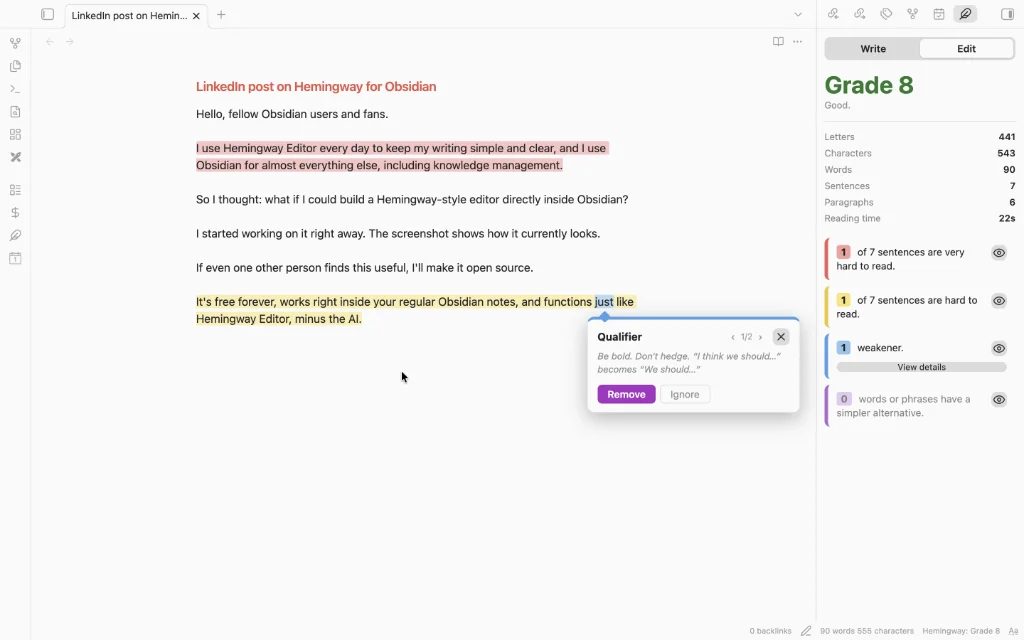
Automatically highlights hard-to-read sentences, adverbs, passive voice and complex words, with a readability grade. Not affiliated with Hemingway Editor.
Features
They are:
- Highlights as you type: Live Preview, Source mode and Reading view all work.
- Click a highlight and it explains itself: A small card pops up with a one-line reason and a button.
- The side panel gives you the grade: It shows the reading grade, letters, characters, words, sentences, paragraphs and reading time, plus a card for each type of problem with a count.
- Write and edit tabs: Write hides every highlight so you can just draft. Edit turns them back on.
- Select some text and the panel switches to that: Handy when you only care about one paragraph.
- Goals, if you want them: Set a word goal for a note, or a daily goal across everything. You get a progress bar and a streak counter.
- Focus mode: Hides the sidebars, tabs and status bar.
Our view
If you find yourself often making use of the Hemingway Editor, this plugin will make your life easier. Say goodbye to cutting and pasting.