Obsidian plugins: Books
News from the world of markdown
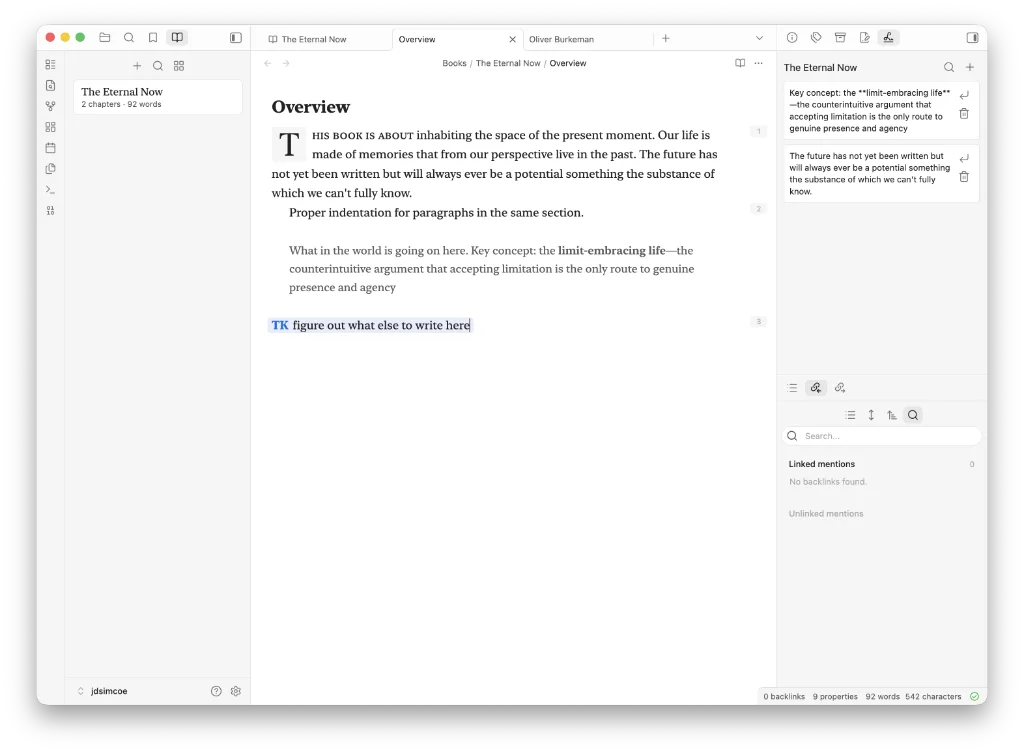
The developer says…
Books is an Obsidian plugin for writing and organising long-form manuscripts in your vault. It adds a dedicated book authoring environment on top of regular markdown files, with a left-side book navigator, a spine view for structuring chapters… manuscript styling, scratchpad capture and markdown export.
Books are stored locally in your vault under Books/. No cloud service, telemetry or external account is required.
Features
They are many:
- Books navigator: A left sidebar view that lists your books with chapter and word counts.
- Book spine view: A main workspace view for organising a book into sections, chapters, interludes, appendices, back matter and canvases.
- Drag reordering: Reorder chapters, move chapters into/out of sections, and rearrange sections directly in the spine.
- Readable manuscript tabs: Book files keep stable storage filenames while displaying human-readable book and chapter titles in the editor UI.
- Manuscript styling: Book chapters get a focused writing treatment with serif typography, drop caps, paragraph indentation, paragraph numbering, small caps and TK highlighting for information that needs to be added later.
- Scratchpad: Save snippets from selections into a per-book scratchpad, search them, drag them back into a chapter, or insert at the cursor.
- Research sidebar: Search recent notes and note blocks outside
Books/, then insert them as publishable blockquote citations. - Canvas support: Add Obsidian canvases into a book spine for idea exploration alongside prose chapters.
- Export: Compile the ordered spine into one markdown manuscript file for hand-off to Word, Google Docs, LaTeX, HTML or other tools.
- Books mode: Opening a book chapter or spine switches the left sidebar to Books; opening regular notes switches back toward files.
Our view
We don’t like plugins that force you down a road you may not be comfortable with. Drop caps and serif typography are one of those roads. That’s okay if you want to preview your work. But many prefer to write in a sans-serif font; a handful of others in a monospace font. Besides, the whole issue of fonts is for the publisher to decide; let’s leave that to them.
Export is another choice you have to make, but you don’t have to make that choice till the end, once you have written your book. There are other plugins that may be able to help in this respect.
We like the fact that no telemetry and no external account are required.