The Markdown Link no. 70
Links to the best markdown editors, static site generators, CMSes, and markdown viewers
An occasional post1 from The Markdown Handbook.
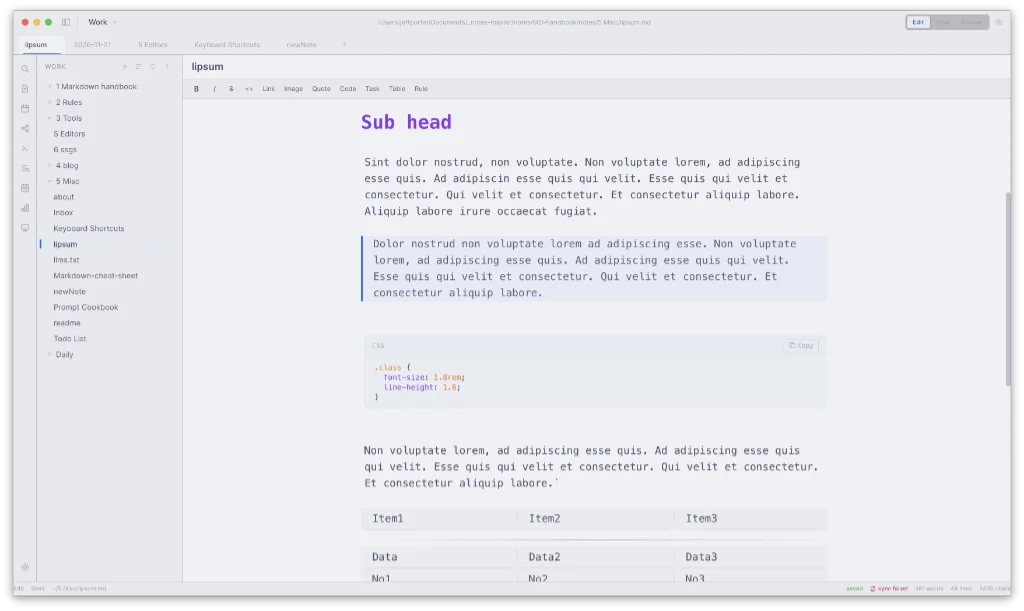
Among today’s links2 are markdown editors3 Noteriv and Glifa, plus we look at DaraCMS, which has a built-in markdown editor that offers a live preview.
- Noteriv is a free and open-source markdown editor. It is aimed at developers, writers, researchers or students. Change any of font, font size and line height in
Settings > Editor. The editor width you have no control over. So the live preview editor sits at a reasonable width, in my opinion, but the source editor fills out the width of the viewport. I have no idea why many developers choose this option, but they do. Wiki links can be used to connect notes and there’s space for a journal. In fact, calendar view links directly to the selected day’s daily note, assuming you have made one. Syncs three ways: through a Git remote, mirrored folder or WEBDAV. Ships with an MCP server. Available for macOS, Linux, Windows, Android and iOS. - DaraCMS is a content management system with a simple editor that supports markdown and live preview. Update front matter with a simple form, and upload and manage your media files via its interface. The cost is $5 per user per month, so team members can be involved. Requires you to create a login.
- Glifa allows you to write plain markdown that looks finished while you type. So it has what’s known as a live preview. You can edit the raw markdown if you prefer. Press ⇧⌘R and use voiceover to ask for a table, a diagram, a summary or a better sentence. Nothing changes until you click
Replace. Use it on up to three macs. AI is provided by Apple Intelligence, two local providers or a number of other sources reachable by adding their API keys. You can remove access to all by clicking a simple toggle. Worth bearing in mind that Apple Intelligence is on by default. Free for 15 days after which Glifa costs $14.99 once (launch price, £19.99 thereafter). Export is to PDF, HTML, DOCX or RTF. There is also a long list of export options you can make via Pandoc. But, strangely, markdown is not mentioned. Available for macOS.
Haven’t found what you’re looking for? Try this site’s list of recommended markdown editors.
Small print
Fonts: Many screenshots on this site use a font in the editor called iA Writer Mono, made freely available by the company behind iA Writer, another markdown editor.
Development: I am not a developer. So, I am not the developer of any of the apps mentioned above or elsewhere on this site. Nor am I earning a commission from any of the apps mentioned above or on this site. I wish I was a developer, because I would make the best markdown editor the world had ever seen. Probably.
Testing: I use Macs to test out the apps, usually a 2022 MacBook Air (M2, Silicon); occasionally, a 2017 MacBook Air (Intel). Apps available for other operating systems are merely mentioned as a courtesy, and for the purposes of completeness.