The Markdown Link no. 69
Links to the best markdown editors, static site generators, CMS’s, and markdown viewers
An occasional post1 from The Markdown Handbook.
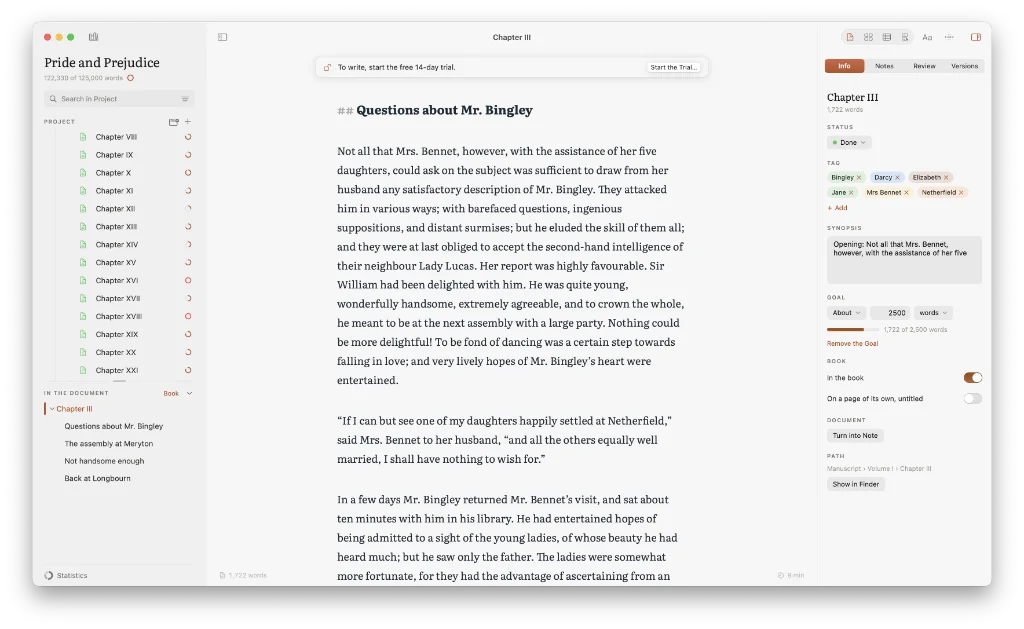
Among today’s links2 are markdown editors3 MDash and Finis, also a book editor. We also look at Typen, a browser-based PDF tool that produces results in seconds.
- MDash is a markdown editor. Write notes, books, tasks or keep a journal, each has its own designated place in the file sidebar. There is a useful book template to get you started, covering front matter, manuscript, back matter, notes and research, characters and places, and comments. MDash offers you complete control over the look of your notes, with font, font-size, line spacing and editor width all accessible in settings. One thing that bothers me about MDash is storage. Where are all your files kept? If you select a folder for backup, you can see all your files. They are stored in the folder selected as a list of notes with their original folders discarded. The developer claims: “Documents live wherever you save them on your Mac.” But where are they stored after being imported to MDash? I am still none the wiser. Export to RTF, PDF, JPG, HTML, DOCX and EPUB. Unlocking pro adds further options. Subscribe for $9.99 a year or $1.99 a month, or buy it outright for $24.99. Available for macOS and iOS.
- Typen is a PDF tool. Drop a markdown note on its browser window, choose a style and download a paginated PDF in matter of seconds. There are four styles to choose from: minimalist, readme, editorial or readnight, a dark theme. Typen is free to use, there are no watermarks and there’s no sign-up involved. Available everywhere.
- Finis is a markdown editor that has been built with book authors in mind. Font choice is limited to serif, possibly Literata, and sans-serif, probably iA Writer Quattro, but you have a degree of control over the line height, line length and editor width. As well as the chapter and verse of your manuscript, there are separate sections for notes (characters and places) and media (images and sources). Words are counted on a per project and document basis. Exports to markdown, book PDF, EPUB, Word, manuscript PDF or HTML, with the additional option of exporting your entire library as a zipped archive. Fourteen-day free trial, then pay $34.90 once. Available for macOS.
Haven’t found what you’re looking for? Try this site’s list of recommended markdown editors.
Small print
Fonts: Many screenshots on this site use a font in the editor called iA Writer Mono, made freely available by the company behind iA Writer, another markdown editor.
Development: I am not a developer. So, I am not the developer of any of the apps mentioned above or elsewhere on this site. Nor am I earning a commission from any of the apps mentioned above or on this site. I wish I was a developer, because I would make the best markdown editor the world had ever seen. Probably.
Testing: I use Macs to test out the apps, usually a 2022 MacBook Air (M2, Silicon); occasionally, a 2017 MacBook Air (Intel). Apps available for other operating systems are merely mentioned as a courtesy, and for the purposes of completeness.