The Markdown Link no. 67
Links to the best markdown editors, static site generators, CMS’s, and markdown viewers
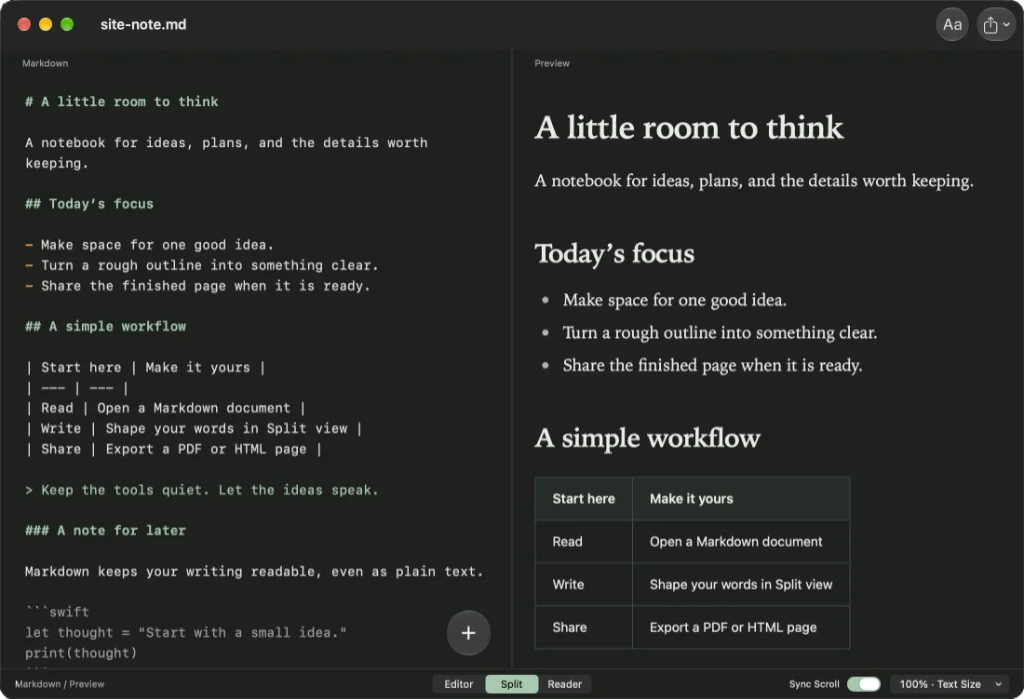
Among today’s links1,2 are markdown editors3 InstantSlate and RenderMD, plus there’s a link to WolfMark, a markdown reader.
- InstantSlate is a native markdown editor built with SwiftUI and TextKit 2. A native app can lead to better performance, lower memory use, improved battery life and stronger system integration. It has a tiny footprint, weighing in at only 4.6MB. There are reader, editor and split views. Headings, lists, tables and code are styled for easy reading, with the text size going from 75% to 200%. Split view keeps source and preview side by side, with synced scrolling and syntax highlighting. Add images, links and tables from the
Insertbutton, or drag in ready-made snippets from the bottom bar. Export is to HTML or PDF, which could do with a few more options, such as markdown and rich text. AI is unheard of in this neck of the woods. Cost is £4.99, which covers you for the Mac, iPhone and iPad. Available for macOS and iOS. - RenderMD is a browser-based markdown editor. It is described as a workspace for clear technical writing. You can use your browser’s built-in zoom controls if the type is too small, but there is no other way to adjust the font size. Write, split screen and read are the three options available. Export is to PDF only, or you can share a link to an article. Click the share button to copy a link direct to your clipboard. On opening the shared link, the recipient receives a read-only view of your work, which they can export to PDF. Available everywhere.
- WolfMark Reader renders Mermaid diagrams, tables and fenced code blocks inside the document. This takes place on your Mac and works offline with no web service involved. Switch to source mode whenever you want the plain markdown. Not available in the UK. Available for macOS.
Haven’t found what you’re looking for? Try this site’s list of recommended markdown editors.
Small print
Fonts: Many screenshots on this site use a font in the editor called iA Writer Mono, made freely available by the company behind iA Writer, another markdown editor.
Development: I am not a developer. So, I am not the developer of any of the apps mentioned above or elsewhere on this site. Nor am I earning a commission from any of the apps mentioned above or on this site. I wish I was a developer, because I would make the best markdown editor the world had ever seen. Probably.
Testing: I use Macs to test out the apps, usually a 2022 MacBook Air (M2, Silicon); occasionally, a 2017 MacBook Air (Intel). Apps available for other operating systems are merely mentioned as a courtesy, and for the purposes of completeness.