The Markdown Link no. 64
Links to the best markdown editors, static site generators, CMS’s, and markdown viewers
An occasional post1 from The Markdown Handbook.
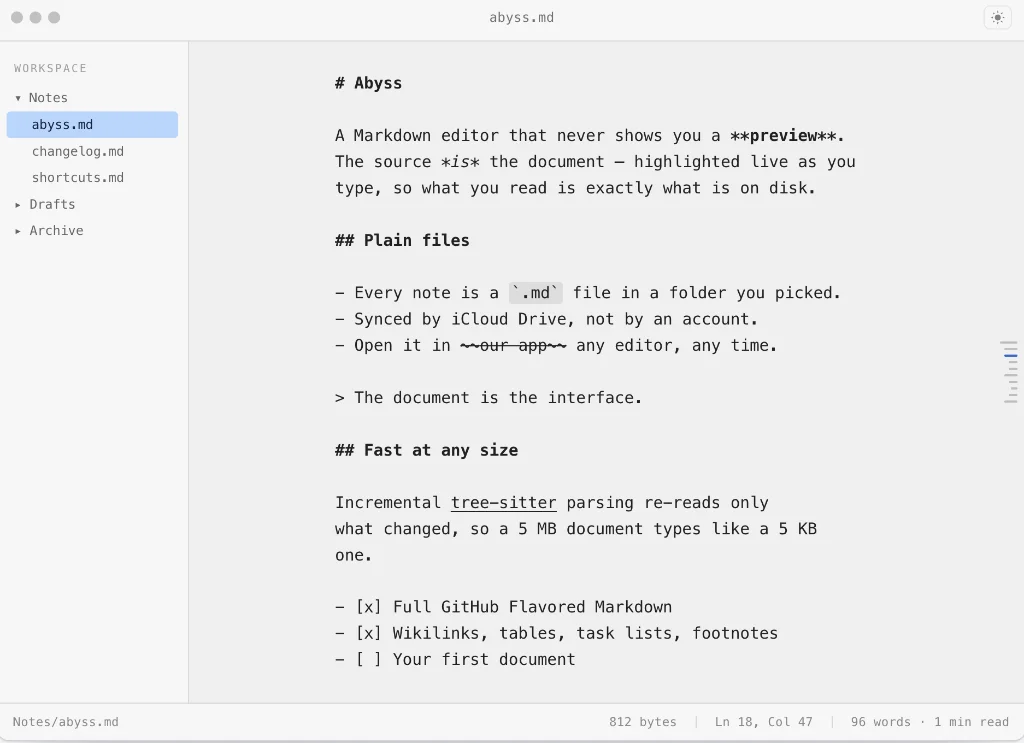
Among today’s links2 are markdown editors3 Abyss and Hibi. There’s also a link to a sticky note app called Littlespace – it likes to live on the edge.
- Abyss is a free markdown editor built for the Mac; it includes an iPhone/iPad version. Use it to store stories and articles, books, diaries, a personal knowledge base and personal wikis. It delivers a styled source never a preview. This will suit some, not others. Not having access to a view of the final output may get in the way at times, depending on your workflow. It makes life more difficult when it comes to proofreading your work, for example, especially when there are lots of links involved. Choose focus session (⌘⌃⇧F) and it allows you to set a timer. While focused, your Mac remains locked for the length of time selected so your complete focus is on the editor. There is no access to the web or other apps during this time. Hold
Escfor five seconds to end the session early. Change the font, font size, line height and line length in settings. ⌘P allows you to search for other files and ⌘⇧P to change workspaces. Workspaces appear in the left sidebar and the outline floats on the right. Transpose these in settings according to your personal preference. There’s also a feature that allows you to protect workspaces and reopen them with Touch ID. Export is to PDF, HTML, Word or rich text. Available for macOS and iOS. - Hibi is free and open-source markdown editor and there is strong evidence that AI has been used in its creation. It is also an Electron app. An alternative to Obsidian? The developer says: “Obsidian is built around a knowledge base. Hibi is a general writing app that can be a knowledge base too.” Various add-ons allow you to transform Hibi into a knowledge management app. Wiki links, for instance, work via an add-on. It offers no controls over the font, font size, line height or editor width, although you can zoom to adjust the font size; that said, zoom affects the entire interface, rather than just the content. There is a zen mode available in settings, but do you really want zen mode if your text fills out the entire width of your screen. Most of the problems mentioned could be fixed with a few additions to settings, such as a choice of fonts, ability to adjust font size and to set a comfortable reading/writing width. For what purports to be a writing tool first, Hibi doesn’t set out its stall well at all. Beyond markdown, Hibi allows writing in Typst, Latex, mdx, and more. Export is to PDF only. Available for macOS, Linux and Windows.
- Littlespace is a sticky note app that allows you decide where they are placed, on the edge of your screen, top, left, bottom (above your dock) or right. Hover over the selected edge and your notes are revealed. Littlespace adds your notes to Apple Notes and tasks are added to the Reminders app. Cost is 9 euros (first 50), 14 euros thereafter. Available for macOS and iOS (coming soon).
Haven’t found what you’re looking for? Try this site’s list of recommended markdown editors.
Small print
Fonts: Many screenshots on this site use a font in the editor called iA Writer Mono, made freely available by the company behind iA Writer, another markdown editor.
Development: I am not a developer. So, I am not the developer of any of the apps mentioned above or elsewhere on this site. Nor am I earning a commission from any of the apps mentioned above or on this site. I wish I was a developer, because I would make the best markdown editor the world had ever seen. Probably.
Testing: I use Macs to test out the apps, usually a 2022 Macbook Air (M2, Silicon); occasionally, a 2017 Macbook Air (Intel). Apps available for other operating systems are merely mentioned as a courtesy, and for the purposes of completeness.