The Markdown Link no. 61
Links to the best markdown editors, static site generators, CMS’s, and markdown viewers
An occasional post1 from The Markdown Handbook.
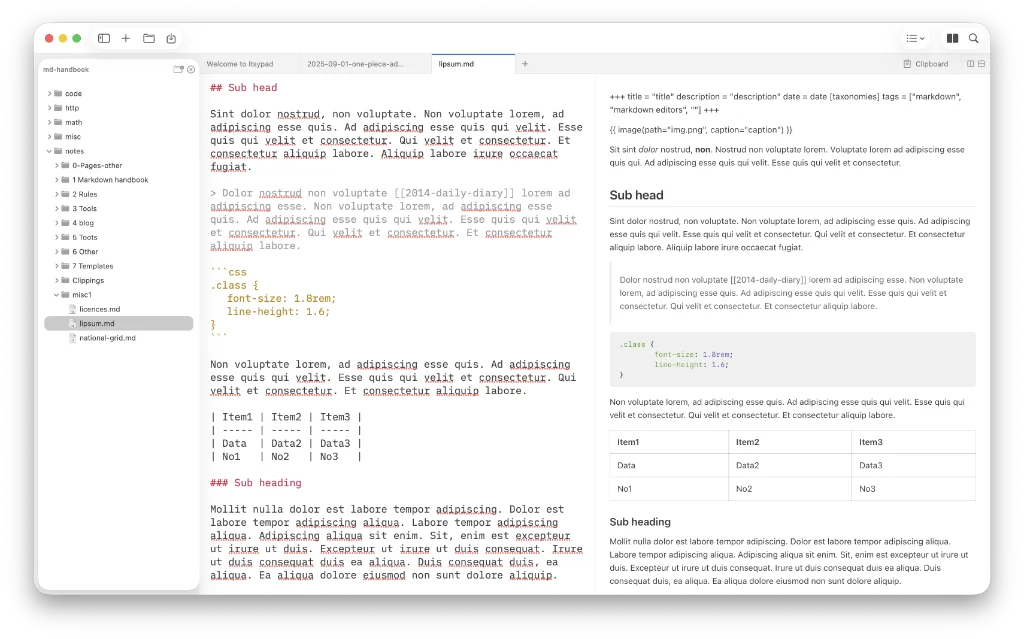
Among today’s links2 are markdown editor3 Itsypad, AnnexEdit and Composer.
- Itsypad is a small, powerful text editor and clipboard manager that is free and open source; the free Mac editor can be downloaded from GitHub. The documentation for the app is on GitHub too. It supports 185+ languages, including markdown. The clipboard manager stores up to 1000 searchable snippets. There’s no control over line length unless you adjust the window size or open up a preview pane. The split pane also allows you to open a second document alongside your first. Split vertically if you prefer that approach. Syntax highlighting takes place in the raw editor rather than there being an explicit ‘live’ editor. There is no way to export, only a simple ‘Save as’ command in the
Filemenu. The paid version of this universal app costs $5.99, which also buys you an iOS app. Available for macOS and iOS. - AnnexEdit is a native editor for Mac. No control over the line length, other than what is available by adjusting the padding in
Settings > General. The command palette (⌘P) offers up the various tools. Export as PDF, HTML or docx. AnnexEdit offers a 14-day trial, after which you have to buy it for 9.99 euros; alternatively, add AI and a JSON editor for 19.99 euros. Available for macOS. - Composer, a web-based markdown editor, is primed to share your work with others. There’s no choice of font or font size so you’re going to have to make do with the developer’s choice. Document width is adjusted by clicking the toggle that appears when you mouse towards the top of the document. Options are narrow, medium and wide. As far as naming a document goes, the app picks up on the first heading of a document you import, whether that’s Heading 1, Heading 2, etc., and currently offers no solution to rename it. So, if you haven’t created the document first in Composer, you’re stuck with whatever it says in that heading. Share a note with a link by adding the other person’s email address. Typing
/on a blank line opens the formatting menu from which you can pick block items such as image and table. The free tier offers seven private notes, up to three collaborators, 10MB upload limit and limitless public documents. Paid costs $5.99 per month ($71.88 a year) and offers unlimited private documents and collaborators. Export is missing, so what you put in, you can’t get out, other than copying and pasting. Available anywhere.
Haven’t found what you’re looking for? Try this site’s list of recommended markdown editors.
Small print
Fonts: Many screenshots on this site use a font in the editor called iA Writer Mono, made freely available by the company behind iA Writer, another markdown editor.
Development: I am not a developer. So, I am not the developer of any of the apps mentioned above or elsewhere on this site. Nor am I earning a commission from any of the apps mentioned above or on this site. I wish I was a developer, because I would make the best markdown editor the world had ever seen. Probably.
Testing: I use Macs to test out the apps, usually a 2022 Macbook Air (M2, Silicon); occasionally, a 2017 Macbook Air (Intel). Apps available for other operating systems are merely mentioned as a courtesy, and for the purposes of completeness.