The Markdown Link no. 60
Links to the best markdown editors, static site generators, CMS’s, and markdown viewers
An occasional post1 from The Markdown Handbook.
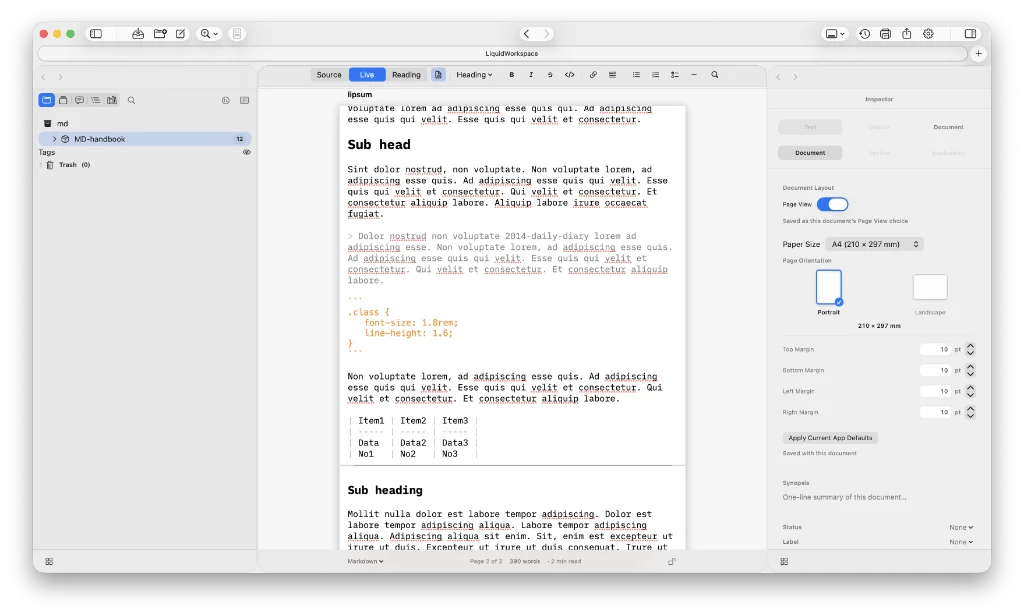
Among today’s links2 are markdown editor3 Caliu, LiquidWorkspace, a long-form editor, and Leafpad, a simple as you like browser-based editor.
- Leafpad is a simple, free web-based markdown editor. I like the fact that you can simply get on with your writing, then download the result for when its needed. Besides markdown tools, Leafpad includes a JSON formatter, a colour picker, placeholder text and a notepad for quick notes and snippets. There’s also a handy password generator. Export options include download to markdown or HTML, or copy HTML. Available everywhere.
- LiquidWorkspace is a native macOS app for long-form writing, research, planning and project organisation. Write in real markdown files, bring in existing folders and vaults, and move between raw text and reading view without locking your work away. For instance, those writing long-form projects in LiquidWorkspace are catered for with binder chapters, corkboard cards, outliner metadata, continuous reading, targets, templates and compile. It doesn’t feel as smooth or fluid as Obsidian, for example. You have to double-click on a note in the sidebar to open it, rather than a single click to switch notes. The setting area is another space where it is open to confusion. Markdown, rich text and plain text are modes, yet they sit right above the font choice, leading the user to believe that the font choice is somehow connected to a particular mode. The page outline in the editor or live views disappears when in reading view. Reading view feels like the right width while the editor and live views are given a much narrower treatment. This is possibly due to the fact that none of the views show your writing at actual size. To anyone familiar with print design, points are different to pixels, where
12pt = 16px. Bear this in mind when setting your desired font size. LiquidWorkspace also has a user guide. Export to PDF, Word or rich text. There’s a seven-day free trial after which it costs $9.99 for a lifetime licence. Available for macOS (26+). - Caliu is a subscription-based markdown editor. Line height differs between paragraphs and lists; why, I don’t know. Wiki links work after a bit of email ping-pong with the developer. Folder trees are not recognised, so all your files are simply dumped into a tags-only tree. Fine if you use tags, not so much if you have a carefully crafted system of folders. Line-length is one thing the developer has got right, for the rich editor at least. And, on the plus side, the range of export options includes markdown, plain text, HTML, PDF, rich text and EPUB. Subscriptions cost £2.99 per month, £17.99 a year and £44.99 buys you a lifetime licence. The minor issues I spoke of should be ironed out, but the tags-only tree may be here to stay, as that is the developer’s choice. Available for macOS.
Haven’t found what you’re looking for? Try this site’s list of recommended markdown editors.
Small print
Fonts: Many screenshots on this site use a font in the editor called iA Writer Mono, made freely available by the company behind iA Writer, another markdown editor.
Development: I am not a developer. So, I am not the developer of any of the apps mentioned above or elsewhere on this site. Nor am I earning a commission from any of the apps mentioned above or on this site. I wish I was a developer, because I would make the best markdown editor the world had ever seen. Probably.
Testing: I use Macs to test out the apps, usually a 2022 Macbook Air (M2, Silicon); occasionally, a 2017 Macbook Air (Intel). Apps available for other operating systems are merely mentioned as a courtesy, and for the purposes of completeness.