The Markdown Link no. 56
Links to the best markdown editors, static site generators, CMS’s, and markdown viewers
An occasional post1 from The Markdown Handbook.
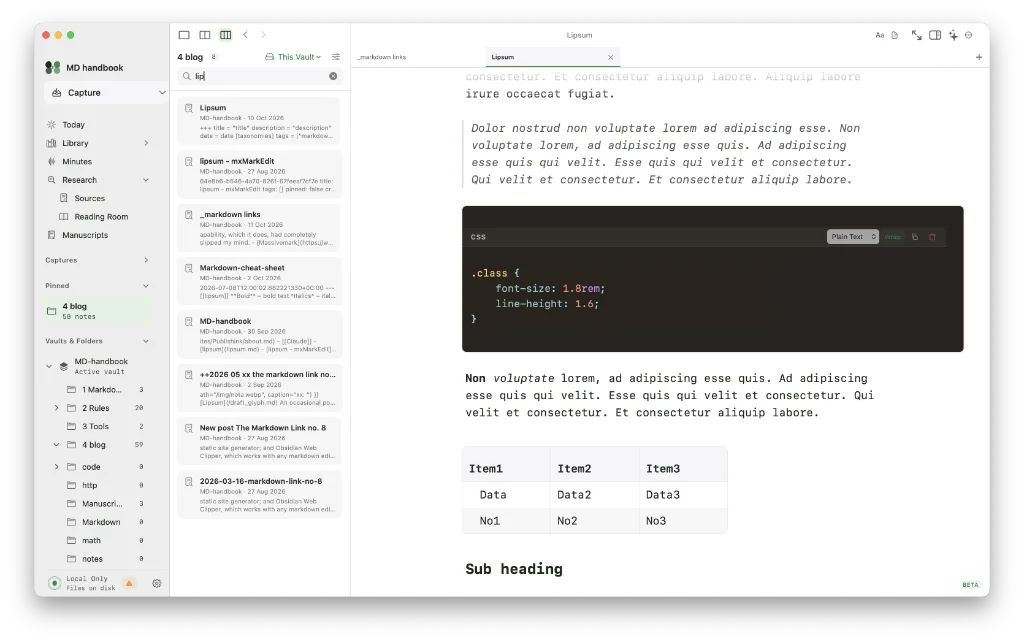
Among today’s links2 are markdown editors3 Header, Futo Notes and OpenKnowledge, plus an AI-based meeting assistant from Google that spruces up your notes.
- Header is a markdown editor, book editor and knowledge manager rolled into one. It is currently in beta, but looks promising. The slash command is available for formatting, with ⌘K bringing up the command palette and document search. Tables, available via the slash command, allow you to choose how many columns and rows you would like. Calculate the size of your table wrong? Change it by adding a missing row or column via the three-dot menu, accessible when you hover over the existing table. AI is off by default, which should please many. Header has an interesting feature called Manuscripts, where you can introduce your longform work: theses, books, screenplays, for example. There’s a research area that includes spaces for sources, such as citations, and a reading room for other documents used in the course of your research. Voice notes and meeting minutes are similarly afforded a space. But settings could do with a shake up. There are too few headings to handle the vast array of changeable settings. Git, for one, should have its own heading, where you can login and choose/create your repository. Calendar is another. Export is to PDF, HTML, rich text, Word, markdown and plain text. If the developer gets the pricing right, I think Header might be worthy of your consideration. Available for macOS.
- Futo Notes is a single-pane markdown editor that presents your words in tiny sans-serif. That’s it. Settings allow you access to dark and light modes, and sync. There’s a sync server for the companion iOS app. The slash command brings up your choice of formats. A useful table editor ditches the need for pipes. Wiki links work. Your documents are saved as markdown files on disk buried somewhere in your Library, on macOS at least. The location is not changeable, as far as I can tell. The documentation has more details. Available for macOS, iOS and Linux, Android and Windows.
- OpenKnowledge is an open-source, local-first markdown editor aimed at those in need of a comprehensive knowledge manager. The 900MB download suggests a web viewer, but there isn’t one. So local models are the most likely culprits, with many, its seems, bundled with the app. OpenKnowledge allows you to store your work with a git provider, the choice being up to you, although it leans heavily towards GitHub. For the writers among you, more concerned with presentation, OpenKnowledge offers no font choice or font size settings. Zoom is available but affects the whole interface rather than simply the content. Similarly, there is no control over the line length or content width, unless you bring the sidebars into play, which might prove a distraction when you are trying to get your head down. It has the slash command for formatting, and to search your documents and apply key commands bring up the command palette (⌘P). There is a live preview, which I assume is where most users will stay, along with a raw markdown view. It handles syntax highlighting well and tables have an impressive builder, with no need for the dreaded pipes. File size aside, there are many things to like about OpenKnowledge, but its constant trumpeting about AI is not one of them, for me anyway. The writer in me also says no. See the documentation for a detailed overview. Available for macOS, Linux, and Windows.
- Google AI Edge Foresight is a bit of a mouthful to say the least, so let’s call it Foresight. It is a meeting assistant. Foresight supports PDFs, Google Docs, Microsoft Office formats, plain text, markdown and web bookmarks. It listens in the background so you don’t have to focus on taking detailed notes. Simply scribble shorthand bullets for things you want to remember, and Foresight ‘enriches them into polished notes’ using the meeting transcript. Foresight works with Gemma, an on-device multimodal embedding model. Available for macOS.
Haven’t found what you’re looking for? Try this site’s list of recommended markdown editors.
Small print
Fonts: Many screenshots on this site use a font in the editor called iA Writer Mono, made freely available by the company behind iA Writer, another markdown editor.
Development: I am not a developer. So, I am not the developer of any of the apps mentioned above or elsewhere on this site. Nor am I earning a commission from any of the apps mentioned above or on this site. I wish I was a developer, because I would make the best markdown editor the world had ever seen. Probably.
Testing: I use Macs to test out the apps, usually a 2022 Macbook Air (M2, Silicon); occasionally, a 2017 Macbook Air (Intel). Apps available for other operating systems are merely mentioned as a courtesy, and for the purposes of completeness.