The Markdown Link no. 55
Links to the best markdown editors, static site generators, CMS’s, and markdown viewers
An occasional post1 from The Markdown Handbook.
Among today’s links2 are markdown editors3 Divan, Cirrus and nTilia, plus MacMD Viewer, which lives up to its name, and a markdown plugin for Emacs.
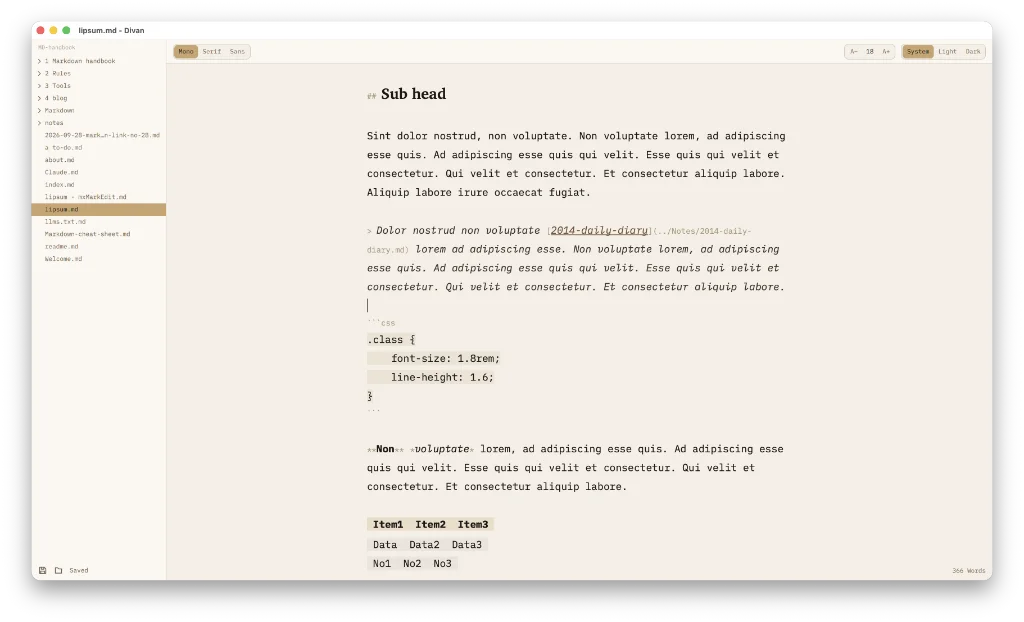
- Divan is a free markdown cum writing tool. Everything is simple about this app. Create/choose a folder for your notes. Markdown syntax is off by default, but there is a simple way to remedy that:
View > Show Markdown. Switch back to live preview if you prefer it without the syntax. Apply markdown by typing out the asterisks/hashes or highlighting words and using a shortcut key (not specified, but ⌘B and ⌘I work, for instance). There are Obsidian-style callouts and a simplified table editor keeps the pipes, hyphens and colons, but sets them up for you. There are three themes: Divan, Sedef and Mermer (Anyone?) or, alternatively, choose from system, light and dark. Typewriter mode if that’s your thing. No hiding the sidebar. No choice of fonts, but select from mono, serif of sans. There are no wiki links so it’s not a PKM. No control over the line length, but the developer’s choice of editor width is acceptable. As I said earlier, Divan is free; buy the developer a coffee to help him cover his costs – that’s the least he deserves. Available for macOS. - Cirrus is a floating notes markdown editor. Press ⌃⌘N from any app and your note floats above it. Press
esc, and it’s gone. Free gives you three notes or pay $4.99 and it’s yours. Available for macOS. - MacMD Viewer is what the name implies, a markdown viewer. But it offers more: live markdown preview, Mermaid viewer, PDF to markdown, markdown to HTML, Word to markdown, and vice versa, the list goes on. Select a
.mdin Finder and pressSpacefor a rendered Quick Look preview, or open a reading window with Mermaid, an outline and auto-reload. Cost is $19.99 for a lifetime licence. Available for macOS. - nTilia is an offline/online notes app aimed at journalists and researchers. It’s a calm markdown editor with a preview and familiar shortcuts. Starts from free (up to 25 articles), add a Pro subscription for $14 a month with unlimited articles, or go the full monty, paying $22 a month for a custom domain.
- Markdown mode for Emacs is a free extension for Emacs that turns that program into a markdown editor. The latest stable version 2.8 was released in March 2026. It is free software, but you have to pay if you want to read the full documentation, $7.99 minimum.
Haven’t found what you’re looking for? Try this site’s list of recommended markdown editors.
Small print
Fonts: Many screenshots on this site use a font in the editor called iA Writer Mono, made freely available by the company behind iA Writer, another markdown editor.
Development: I am not a developer. So, I am not the developer of any of the apps mentioned above or elsewhere on this site. Nor am I earning a commission from any of the apps mentioned above or on this site. I wish I was a developer, because I would make the best markdown editor the world had ever seen. Probably.
Testing: I use Macs to test out the apps, usually a 2022 Macbook Air (M2, Silicon); occasionally, a 2017 Macbook Air (Intel). Apps available for other operating systems are merely mentioned as a courtesy, and for the purposes of completeness.