The Markdown Link no. 49
Links to the best markdown editors, static site generators, CMS’s, and markdown viewers and readers
An occasional post1 from The Markdown Handbook.
Among today’s links2 are markdown editor3 Octopus Ink, Tine, an outliner based on Logseq, and Markdown Panel, a plugin for Notepad++ that has been created to preview markdown.
- Tine is a free and open source ‘vibe-coded’ outliner, similar to Logseq. According to its developer(s): Tine “isn’t a fork and it isn’t a clone trying to pull you away. It’s an independent reimplementation that deliberately targets Logseq’s on-disk format, so your notes stay exactly where they are – plain markdown files you fully own.” So it’s a return to the kind of Logseq many have come to love. You can open one of Logseq’s graphs (make sure it’s a testbed or a backup of your notes) in Tine, make changes and see them in Logseq. I never really got the hang of the original Logseq, possibly because of the reliance on connecting notes when I didn’t need them connected. I didn’t need an outliner when it comes down to it. There has been a lot of discussion of Tine on the Logseq subreddit, so I’ll leave it there. Available for macOS, Linux and Windows.
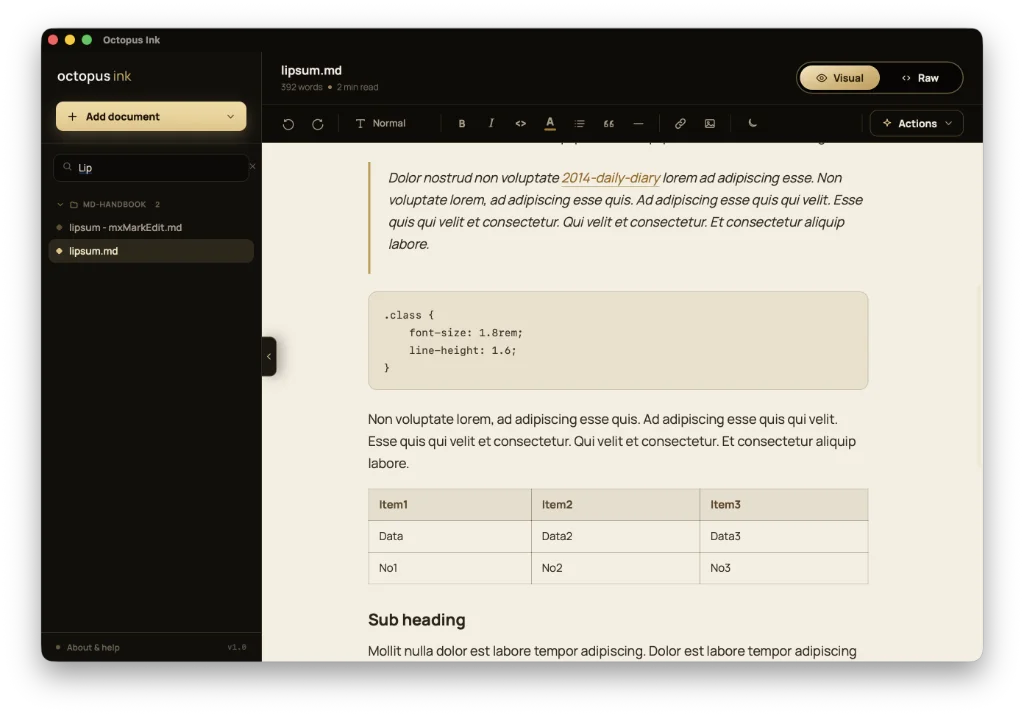
- Octopus Ink is a free and open source markdown editor. Every folder or set of files you open forms its own section in the side panel, so you can keep several folders open together. There are dark and light modes. ‘Visual’ renders your markdown as a styled, editable page, the way your document will look. ‘Raw’ shows the markdown source in a monospace font. In both modes, the note remains editable. The ‘page theme’ toggle (sun/moon in the toolbar) switches the document area between light and dark views. Export is to PDF and html. There is no font choice, font size or editor width (line length) adjustment, although the current set-up offers a decent approximation to a readable width. Octopus Ink does not remember any folders selected during a previous visit, so you’re going to have to open the folder(s) every time you launch the app. The FAQ says otherwise, but that is how it works in my experience. Subfolders are also stripped out, presenting you with just your markdown files. Documentation is limited to the
Help and FAQ, accessed by clicking that link at the bottom of the sidebar. A browser version is accessible when needed. Available for macOS. - Markdown Panel is a plugin for Notepad++, the source code editor and replacement for Notepad. It has been created to preview markdown, displaying rendered markdown HTML with WebView2 Edge or an embedded IE11. Markdown Panel can save rendered html to a file. Dark mode is supported, but requires Notepad++ version 8.4.1 or later.
Haven’t found what you’re looking for? Try this site’s list of recommended markdown editors.
Small print
Fonts: Many screenshots on this site use a font in the editor called iA Writer Mono, made freely available by the company behind iA Writer, another markdown editor.
Development: I am not a developer. So, I am not the developer of any of the apps mentioned above or elsewhere on this site. Nor am I earning a commission from any of the apps mentioned above or on this site. I wish I was a developer, because I would make the best markdown editor the world had ever seen. Probably.
Testing: I use Macs to test out the apps, usually a 2022 Macbook Air (M2, Silicon); occasionally, a 2017 Macbook Air (Intel). Apps available for other operating systems are merely mentioned as a courtesy, and for the purposes of completeness.