The Markdown Link no. 46
Links to the best markdown editors, static site generators, CMSs, and markdown viewers and readers
An occasional post1 from The Markdown Handbook.
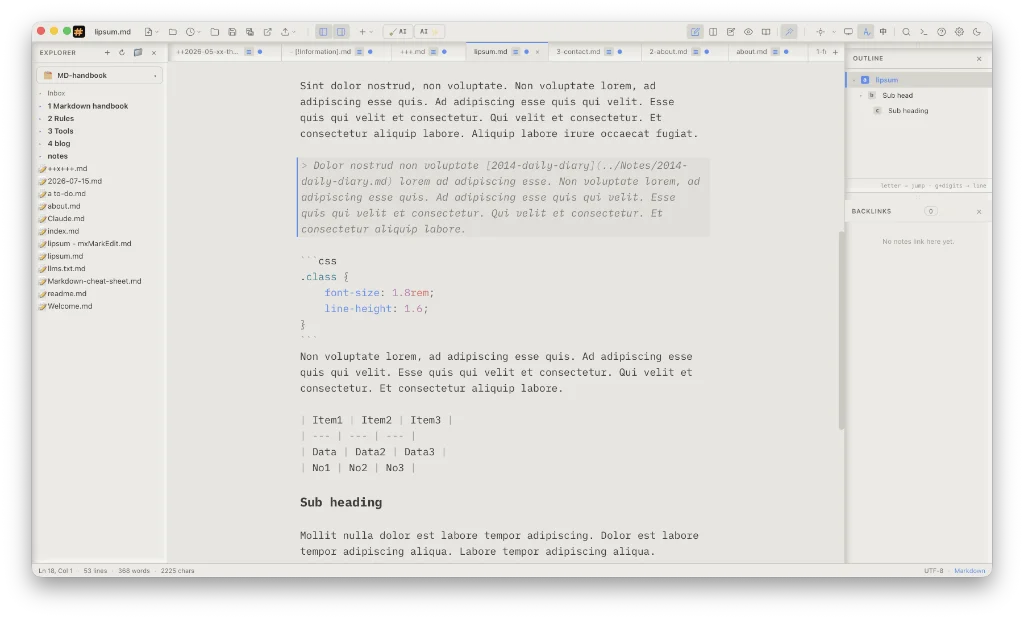
Among today’s links2 are markdown editors3 SoloMD and Minoo, and a static site generator called, obviously, Flowershow.
- SoloMD is a free and open source markdown editor. There is no lock-in, so your files remain on disk, openable by any markdown editor. I like the look of SoloMD; it looks and behaves like a markdown editor should. You can change the font, font size and editor width to suit. GitHub and a number of other providers are available for sync. Themes can be changed to suit. There are still a number of glitches, such as backlinks failing to appear in the sidebar. On the subject of backlinks, there is no popover to assist you with the completion of filenames, which would be helpful. AI access is off by default, so bring your own key if want to turn it on. SoloMD is still being actively developed, so any issues I have described may disappear in future. There’s a useful little trick that sets the sidebar to the parent folder on opening, handy if you want to focus on a particular project. Find it under
Settings > Advanced. The root folder becomes accessible via a toggle menu at the top of the sidebar. Available for macOS, Linux, Windows and iPad. - Flowershow is a static site generator. Publish from GitHub, the terminal, Obsidian or quick drag and drop. Use Flowershow for digital gardens, blogs, wikis or docs. From free for a personal blog or small business website to $5–50 per month or to support the project.
- Minoo is a free and open source markdown editor. Dark mode only, with a number of themes to choose from. Local sync, with the paired devices automatically syncing your notes via the local network. There’s raw markdown rendering of headings, bold text, italic text, lists, horizontal lines, quotes, code and code blocks, links, and tables. The command palette includes search of your document or all your documents, and there’s a sidebar to organise your files. Available for macOS and iOS (requires Apple developer account), or build it yourself.
Haven’t found what you’re looking for? Try this site’s list of recommended markdown editors.
Small print
Fonts: Many screenshots on this site use a font in the editor called iA Writer Mono, made freely available by the company behind iA Writer, another markdown editor.
Development: I am not a developer. So, I am not the developer of any of the apps mentioned above or elsewhere on this site. Nor am I earning a commission from any of the apps mentioned above or on this site. I wish I was a developer, because I would make the best markdown editor the world had ever seen. Probably.
Testing: I use Macs to test out the apps, usually a 2022 Macbook Air (M2, Silicon); occasionally, a 2017 Macbook Air (Intel). Apps available for other operating systems are merely mentioned as a courtesy, and for the purposes of completeness.