The Markdown Link no. 41
Links that attracted my attention recently
An occasional post1 from The Markdown Handbook.
Among today’s links2 are markdown editors3 Zed, Outl and Zettelstore, HydePHP, a static site generator for developers, and Orsn, a research notebook.
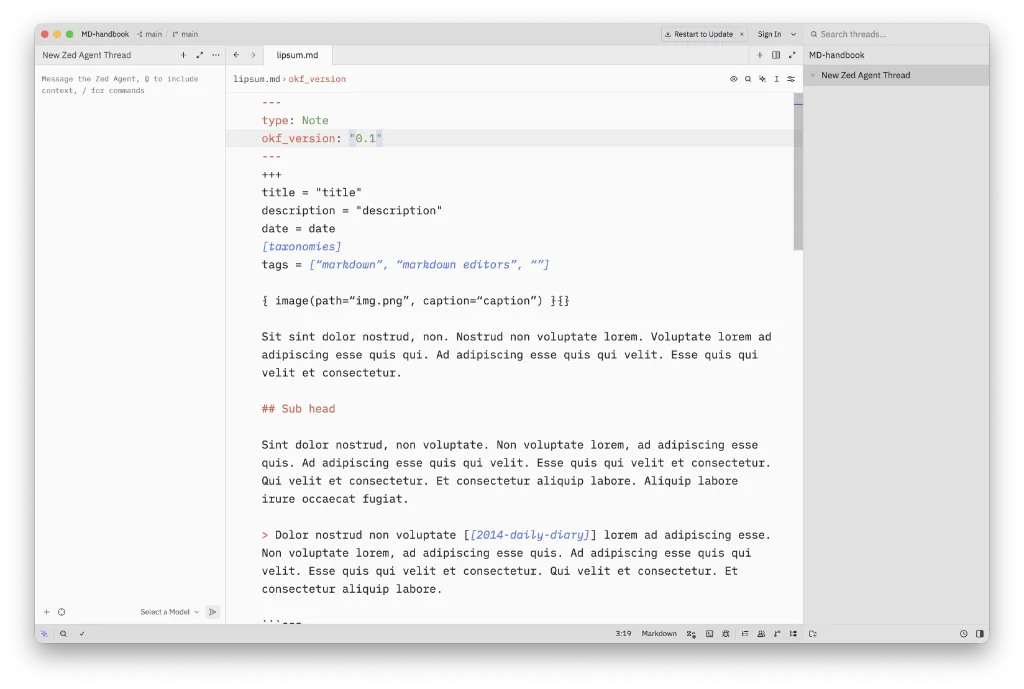
- Zed is described as a next-generation code editor. Supports more than 80 languages without adding any plugins. A quick look around Zed’s ‘millions’ of settings gave me no control over the editor-width; I’m not saying there isn’t one, I simply couldn’t find it. (Edit: macosxguru pointed me in the right direction on Mastodon. The answer lies buried under a mountain of settings for the Editor > Soft Wrap > Choose option ‘Bounded’. Set your Preferred Line Length a couple of lines below Soft Wrap.) Sidebars to the rescue is one way to achieve a readable width (image above). Available for macOS, Linux and Windows.
- Outl is a local-first outliner. Currently in beta, it claims to have solved all the problems associated with Logseq and Roam sync. Two devices sync peer-to-peer to the same tree, end-to-end encrypted. There’s no account, no cloud and there’s no server involved. Delete Outl and your markdown files remain available for another editor to take up the slack. Installation is via Homebrew for macOS, but, fuck, is it a long-winded process.
- HydePHP is a static site generator aimed at developers. It is a command-line interface application that you install on a per-project basis. To use HydePHP, your system must have PHP 8.2 or later installed, along with Composer, and access to a terminal.
- Orsn, or Orson, is described as a research notebook, a tool for collecting data and evidence, documenting process, writing up research findings in interactive formats, and sharing knowledge with others. It can be used to provide supplementary material for published articles or to create a web resource to share research insights. Orsn supports all kinds of research, not just experimental or lab-based work. Specialised outputs can be represented through the use of custom plugins. You create cards (notebook entries), contexts (visualisation) and pages (used for documenting your research) in markdown. It’s all a bit complex to the casual observer and best left to the scientists out there. A notebook can easily be used as the basis for a website or part of a website. Available for macOS, Linux and Windows.
- Zettelstore is a software system for collecting and interlinking notes in order to represent and support knowledge development. It facilitates key tasks in personal knowledge management by explicitly implementing the Zettelkasten method, based on the creation of numerous individual notes, each capturing a single idea or unit of information. As knowledge is typically accumulated incrementally over time, a primary focus of Zettelstore is the long-term preservation of these notes, hence the name Zettelstore. Requires Fossil, Go and Go-based tools.
Haven’t found what you’re looking for? Try this site’s list of recommended markdown editors.
Markdown news
- Bear now supports mermaid diagrams, an open-source JavaScript-based diagramming and charting software that generates diagrams from text-based descriptions. But you knew that already.
- So long, and thanks for all the fish? talks about switching your notes from Logseq to Obsidian. The author’s approach uses a lot of plugins in the process. I have a similar number of notes in Obsidian and quickly found it slowing down, most likely because of the use of plugins. I tamed it by ditching all of them, aside from a handful of core plugins.
- Paste as Markdown is a LibreOffice extension. It does one thing well. When you paste an LLM chat, or any other form of markdown, into LibreOffice you are presented with a well-formatted document rather than being faced with a wall of syntax that you have to reformat by hand.
- nvALT will likely be updated for Silicon by the end of September for those who prefer to keep using it. nvUltra, the new app from Brett Terpstra, should be out around the same time. One thing we can be certain about, it will not be open source.
Small print
Fonts: Many screenshots on this site use a font in the editor called iA Writer Mono, made freely available by the company behind iA Writer, another markdown editor.
Development: I am not a developer. So, I am not the developer of any of the apps mentioned above or elsewhere on this site. Nor am I earning a commission from any of the apps mentioned above or on this site. I wish I was a developer, because I would make the best markdown editor the world had ever seen. Probably.
Testing: I use Macs to test out the apps, usually a 2022 Macbook Air (M2, Silicon); occasionally, a 2017 Macbook Air (Intel). Apps available for other operating systems are merely mentioned as a courtesy, and for the purposes of completeness.