The Markdown Link no. 39
Links that attracted my attention recently
An occasional post1 from The Markdown Handbook.
Among today’s links2 are markdown editors3 Typora, Cogito, Lettera, Canto and V2editor.
- Typora is a markdown editor I came across a number of years ago while having a brief toy with a Chromebook and a Windows laptop. It was the only editor I could find of any worth. In this latest test on macOS, I found it lacking in certain areas. I’d like it to be able to recall which workspace was opened last and open it rather than have to go to ‘Open Recent’ every time you start the app. There is no direct method, i.e. through settings, of changing the editor width, but the option is available to you if you create a ‘base-user.css’ file. Read more on Typora’s support pages. And I don’t see why switching to source mode should equate to focus mode, with the file tree disappearing. But once you get over these initial issues, markdown links are supported, not wikilinks. Export options are numerous. Priced at $14.99 and available for macOS, Linux and Windows.
- Cogito allows you to write markdown like it was meant to be written. Built for power users and developers, but with simplicity and minimalism in mind. Your entire workspace is always within reach, no matter how many files you have. Quick open (⌘P), open files in tabs, favourites and pinned notes and folders, drag-and-drop to reorganise in the sidebar, and add any folder as a location. Synced source and preview scrolling, syntax highlighting for 20+ languages, instant rendering, tables, Mermaid diagrams, math, and more. Power features include wikilinks, Obsidian-style embed, clickable tasks and export as a PDF. Free while in beta. Available for macOS (Tahoe required).
- Lettera (formerly codenamed Panda), a native markdown editor for Mac, has been released in beta on TestFlight. Open any folder as your workspace – only one, mind you, per window – unlike its stablemate, Bear, which prefers to store your files in an SQLite database. There is a choice of sharing options, including plain text, rich text, markdown or HTML and you can export files to PDF, .jpg and ePub. With no access to settings, I cannot figure out what adjustments can be made in terms of font choice, size, line-height and editor width. Wikilinks don’t work although they are assigned to a ⌘D shortcut, so presumably that is something in the works. Available for macOS.
- Canto describes itself as ‘Claude’s markdown companion’. But, looking at it purely as a markdown editor, daily notes, wikilinks, slash commands are all covered. It does not give you much control over the appearance. There are themes, but the limited font choice, font-size and editor-width are a bit of a turn off. As is the ‘Safe mode’, which turns on if you have limited RAM, leaving a yellow alert across the top of the screen, with no way to turn it off. Maybe you will get some leeway with an active licence, available for $14.99, but that’s not made clear and I doubt it. Export is to markdown, html, PDF, or there are a number of custom options. Split screen offers the option of opening another file for reference. Nonetheless, there’s no need for an app to take up 2GB of space, AI friendly or not.
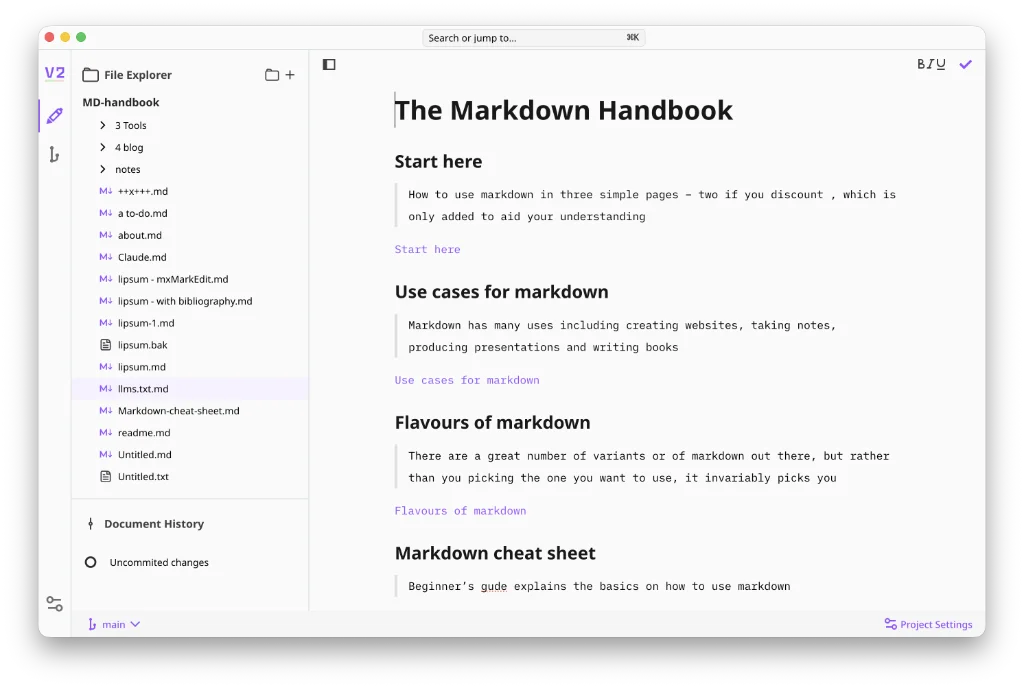
- V2editor is a local-first markdown editor with version control. It only syncs with GitHub, although further git forges may be on the horizon. I have no way of knowing that for sure but the fact that the sync settings say ‘These service providers help you sync your projects across devices and collaborate’ suggests more may be on the horizon. Export to markdown, html, .docx, PDF, or Pandoc. Change fonts, not size. Considering Oktana, V2’s verbose developers, claim to be knowledge workers, wikilinks is a major oversight. But try creating a footnote from the toolbar. It inserts a superscript and your footnote text at the end of the article in one smooth action. Nice touch. Just a pity there are no shortcut keys to achieve the same thing. Available for macOS, Linux and Windows.
Haven’t found what you’re looking for? Try this site’s list of recommended markdown editors.
Markdown news
- Pandoc has released v3.10, enhancing its functionality as a command-line utility that enables the conversion of files between various markup formats. Pandoc’s markdown provides such features as footnotes, tables, flexible ordered lists, definition lists, fenced code blocks, superscripts and subscripts, strikeout, metadata blocks, automatic tables of contents and embedded math. Users looking for a stricter markdown format can disable the enhancements.
Small print
Fonts: Many screenshots on this site use a font in the editor called iA Writer Mono, made freely available by the company behind iA Writer, another markdown editor.
Development: I am not a developer. So, I am not the developer of any of the apps mentioned above or elsewhere on this site. Nor am I earning a commission from any of the apps mentioned above or on this site. I wish I was a developer, because I would make the best markdown editor the world has ever seen. Probably.
Testing: I use Macs to test out the apps, usually a 2022 Macbook Air (M2, Silicon); occasionally, a 2017 Macbook Air (Intel). Apps available for other operating systems are merely mentioned as a courtesy, and for the purposes of completeness.