The Markdown Link no. 35
Links that attracted my attention recently
An occasional post1 from The Markdown Handbook.
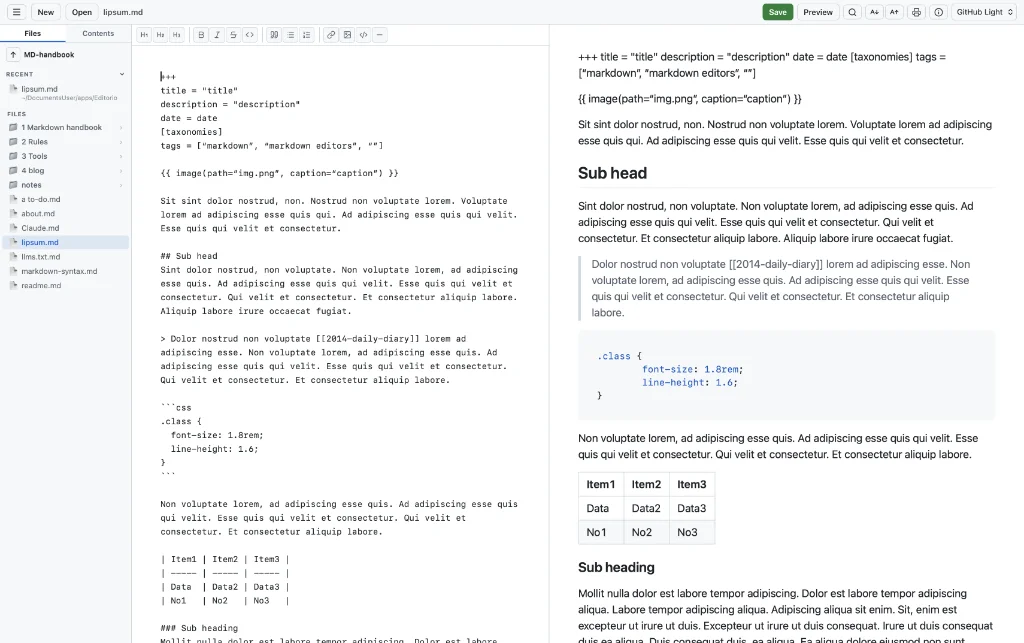
Among today’s links2 are markdown editors3 Editorio, Byword, Marka and Magic Notebook. There’s also a quick look at AS Notes, which brings the power of knowledge management to VS Code.
- Editorio is a text, markdown and coding app with a preview, various themes including light and dark. But there are is no means to adjust font choice, font-size (other than zooming in), line-height or the editor width. Export as PDF only but the power of Editorio shines through with the ‘Save as’ command, which allows you to choose from a multitude of languages, including Swift, Python, Typescript and Rust. Syntax highlighting is also available for each language. Shortcuts are available through the command palette, brought up with ⌘⇧-P, but this doesn’t appear to work. There’s an irritating minimap that won’t go away, but the download only takes up 40MB of available RAM, according to its developer. Available for macOS.
- Byword is one of those apps I think of as one of the ‘originals’ – it was around soon after I started using markdown – and remains active on my desktop where it is used to export to rich text for an editing job. But it gets little use otherwise. Byword also exports to html, .docx, PDF and LaTex. This single-pane app – there’s no sidebar – is one of the few apps where I can select ‘wide’ mode for reading/writing and it maintains a sensible editor width. It was last touched by its developers in 2023, as far as I can tell, and has apps available for macOS (App Store, $10.99) and iOS (App Store, $5.99).
- AS Notes is an extension that brings the power of wiki-link-based knowledge management directly into VS Code, or VSCodium, whichever is your code editor of choice. Simply type
[[to trigger page selection, just like you would in Obsidian, Logseq or any number of apps. - Marka is a free, open-source markdown editor. What I like is that you can choose from your entire document tree, which appears in the sidebar; but this excludes iCloud, so you’ll have to find some other way of syncing your docs, such as using Hazel or Syncthing. What it lacks: export of documents; no focus on the editor; shortcut keys, that I can find anyway; increasing font size only affects the preview, not the editor; and there’s no font choice. Available for macOS, Linux and Windows.
- Magic Notebook is a free, AI-assisted app, or at least it will be AI-assisted when the developer gets around to it, probably in autumn 2026. You have to enable developer mode, found in Settings, to use markdown and there is no control over the theme for now. Magic Notebook’s developer, Vladimir Nikishin, says: “The AI features will be completely optional. My plan is to add an AI writing consultant, not turn Magic Notebook into an AI-first app. The core experience will stay focused on calm, distraction-free writing, and people who don’t want AI should be able to ignore it entirely. Right now Magic Notebook is still a pet project I build in my free time outside my main job…” There are a few rough edges to iron out, but Magic Notebook looks like it is on the right track. Available for macOS and Windows (due June 2026).
Haven’t found what you’re looking for? Try this site’s list of recommended markdown editors.
Markdown news
- Developer Tim Abel talks about why he left Logseq for Obsidian and what it means for his in-development app, Markdown Neuraxis.
- “For over 16 years” you, apparently, have been looking for a way to buy iA Writer for Mac and Windows directly from the source. Under the company’s new licensing arrangement that’s now made possible.
- Bore yourself to death with this visual guide to PDF templates you can create in Pandoc. Only when you have time on your hands, you understand.
Small print
Fonts: Many screenshots on this site use a font in the editor called iA Writer Mono, made freely available by the company behind iA Writer, another markdown editor.
Development: I am not a developer. So, I am not the developer of any of the apps mentioned above or elsewhere on this site. Nor am I earning a commission from any of the apps mentioned above or on this site. I wish I was a developer, because I would make the best markdown editor the world has ever seen. Probably.
Testing: I use Macs to test out the apps, usually a 2022 Macbook Air (M2, Silicon); occasionally, but rarely, a 2017 Macbook Air (Intel). Apps available for other operating systems are merely mentioned as a courtesy, and for the purposes of completeness.