The Markdown Link no. 34
Links that attracted my attention recently
An occasional post1 from The Markdown Handbook.
Among today’s links2 are markdown editors3 Neon Vision Editor, Breveto, Inkwell, Notelane and Beaver Notes.
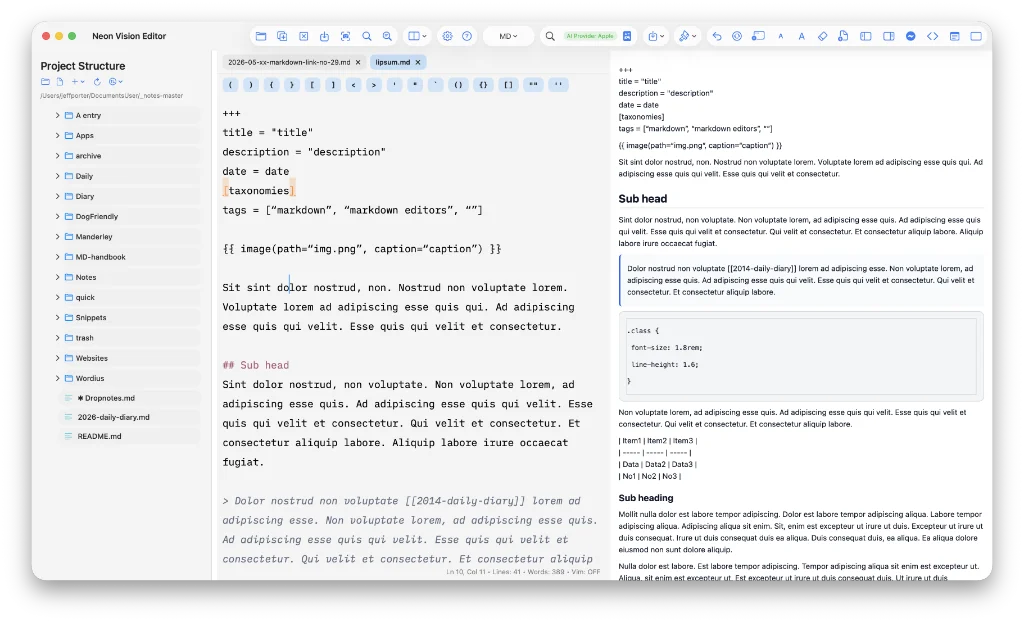
- Neon Vision Editor is a lightweight, modern markdown and code editor, with a focus on speed, readability and automatic syntax highlighting. Minimal by design, in markdown mode it has a useful split screen presentation of the preview. Editor width, I thought at first, was only controllable by opening the project structure (right or left), the outline and preview, as there’s no default setting. Then I discovered focus mode, its more common name, is heavily disguised as ‘Brain Dump Mode’. There is no support for tables or wiki-links. The default theme lives up to the name of the app, so you might want to tone that down a bit. As far as coding goes, it covers more than 30 languages, which is more than adequate, and makes it worthy of being added to this site’s list of markdown editors. It is free, but accepts donations, which are used to support the app. Available for macOS.
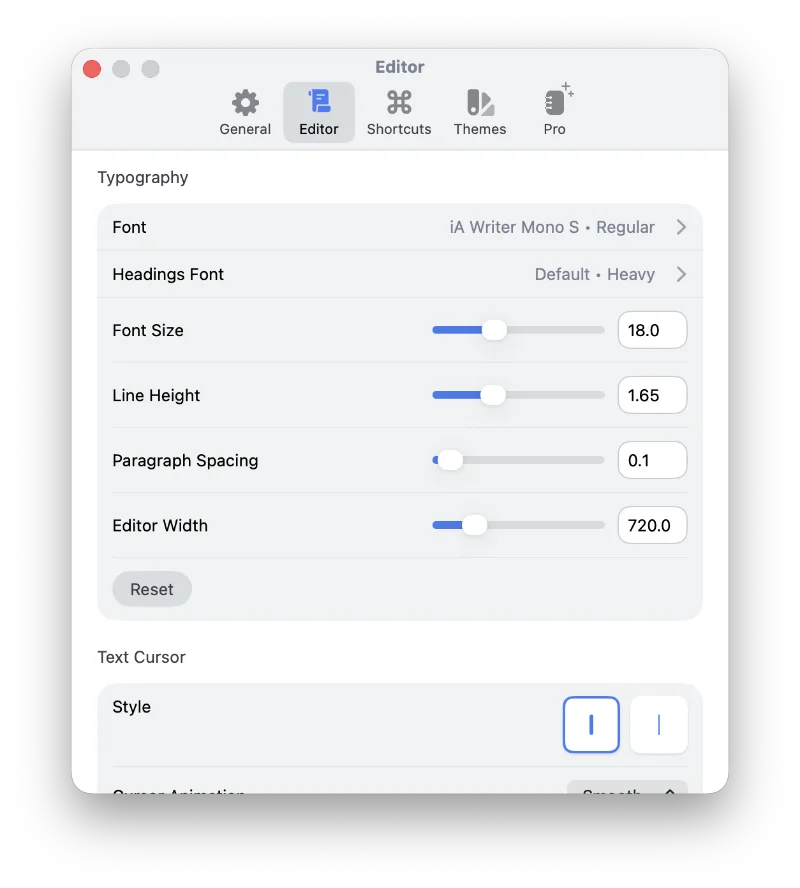
- Breveto describes itself as a note-taking app, but it has markdown more than covered. Effortlessly import all your markdown files and folders, and sync them with iCloud. It is missing a raw/source mode so you can copy the markdown, but the export to markdown option seems to work equally as well. You can also export to plain text, Text bundle, html and .docx. It was only while scanning the preferences/settings that I discovered the perfect set-up, allowing me to chose my font, font-size, line-height and editor width in one small screen (image below). So Breveto gets the thumbs up from me, sort of. There’s a seven-day free trial, then Breveto is subscription only at $39.99 per year, which includes an iOS app that some might find useful. Even still, many will find the price excessive, given that many similarly priced apps give you a lifetime licence for the same money. Available for macOS and iOS.
- Inkwell is a good looking, split pane markdown editor. It has a focus mode, but, weirdly, the focus is on the preview rather than the editor. The desktop version requires familiarity with Windows to be able to operate the screen controls and there’s no ‘full-screen mode’ to make use of Apple’s Spaces feature. Font choice doesn’t work in the editor, only preview for some reason known only to the developer, and there are no adjustments for line height or editor width. I can only assume this set-up works better on Windows, but you will have to let me know on that score. Free users will be confronted by an annoying opening screen, requesting you to buy a licence. Menus are almost empty, with most of the limited options available in the sidebar. Available for macOS, Windows and online.
- Notelane is a free notes app for iOS. It supports wiki-links, improving navigation of your notes, and will sync with any folder in iCloud. So, in return, you get an iOS companion app that works with any macOS app that syncs to iCloud. It opens your documents in preview mode and you have to click to view the markdown. There is no sign the developer, a digital product designer and user interface expert, is thinking of building an app for macOS, but if he was…
- Beaver Notes, in spite of its rather clumsily designed toolbar, has a lot of useful features. It is open-source, privacy-oriented and designed to be local first; it’s also free. There is a folder view you get to from the sidebar/archive, but it’s not immediately obvious – to me anyway – how Beaver syncs files with the selected path. There are no accessible .md files that you can easily open in other apps, only a .json file. Wiki-links are accessed with
@@, rather than the usual[[. The headings have an odd indent and the folding icon is misaligned, but I’m sure these will be fixed in time. There is no charge or prompt to pay, but donations are requested. Share rather than export notes to BEA (a custom extension), html, PDF and markdown. Available for macOS, iOS (Testflight), Linux, Windows and Android (beta).
Markdown news
- The latest update to Basecamp, the project management app that this former project manager never found a use for, now includes markdown support; we have only had to wait 22 years. And there was me thinking I was slow.
- Logseq Doctor is a tool that takes your old markdown files and converts them into a format that’s usable in Logseq, thus preserving your knowledge base. Obsidian Doctor is not planned or foreseen, but I look forward to the inevitable avalanche of plugins.
- Despite warnings, many users of nvALT kept their notes in a database instead of individual files. Brett Terpstra, the app’s developer, has come up with another app, nvalt-export, to ride to the rescue.
Small print
Fonts: Many screenshots on this site use a font in the editor called iA Writer Mono, made freely available by the company behind iA Writer, another markdown editor.
Development: I am not a developer. So, I am not the developer of any of the apps mentioned above or elsewhere on this site. Nor am I earning a commission from any of the apps mentioned above or on this site. I wish I was a developer, because I would make the best markdown editor the world has ever seen. Probably.
Testing: I use Macs to test out the apps, usually a 2022 Macbook Air (M2, Silicon); occasionally, but rarely, a 2017 Macbook Air (Intel). Apps available for other operating systems are merely mentioned as a courtesy, and for the purposes of completeness.