The Markdown Link no. 32
Links that attracted my attention recently
An occasional post from The Markdown Handbook.
Among1 today’s links2 are markdown editors Neverwrite, Lumen, Notchpad and Marco. Plus there’s Affine, an open-source knowledge management app, similar to Notion, but better, in my opinion.
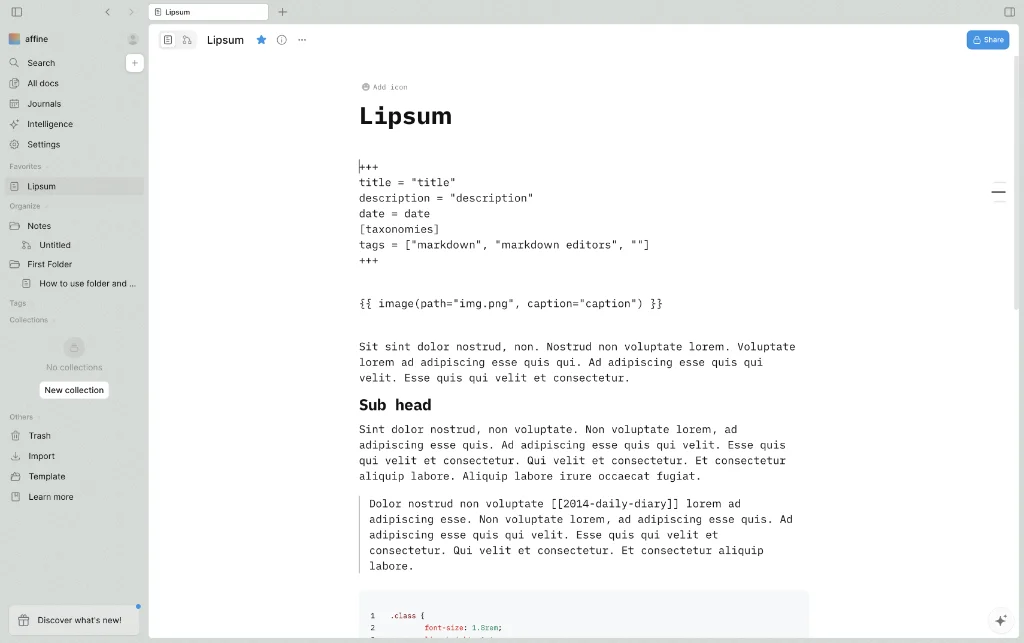
- Affine, or AFFiNE if you prefer, is not unlike Notion or Miro. Except it is unlike Notion. Affine gives you a useful representation of your markdown document (see image above) and allows you to import in a number of formats, including markdown, markdown zip (includes media files), html, .docx and Notion. As far as I can tell, there’s no way to import folders, so you may have to make do with importing individual documents or start from scratch. Folders were requested as a feature back in 2023 and the closest I can find is that it has been “in development” ever since. Disable AI by going to
Settings > Editor > Affine AI; knock out telemetry while you’re at it,Settings > About Affine. Affine has a free offering, which allows up to three members per workspace and should suit most needs; paid options start from $6.75 per month. Available for macOS, Linux and Windows. - Neverwrite is a markdown editor that functions with AI. Downloaded it weighs in at an incredible 2GB. Compare that with Adobe InDesign, for example, which eats up 2.5GB of your space, which is forgiveable given it is a design app, not a simple note app. But with all the AI tools stripped back, Neverwrite is quite a pleasant editor to work with. But the name alone was enough to turn me off, as if there is never a need to write any more – just let AI do all the grub work for you. In its current state, I don’t see Neverwrite ‘ever’ being added to this site’s list of recommended markdown editors.
- Lumen is a “minimalist productivity system inspired by GTD, Obsidian, Zettelkasten…”. The task list is where it gets most of its inspiration for GTD from. Ollama, an LLM, runs locally without an AI key nor any means of disabling it. It’s unusual, I know, for a notes app but it connects to Outlook for drafting purposes; no other email client is tied in, so you won’t be getting AI assistance with drafting your messages in Apple Mail, for instance. There are a limited number of free licences. If you are successful, go to
Settings > Updates, scroll to the bottom and activate the founder licence. Available for macOS, Silicon or Intel. - Notchpad is a free, browser-based markdown editor with syntax highlighting, auto-save and four export formats. It supports GitHub-flavoured markdown, including tables, task lists and fenced code blocks with language highlighting. Edit, preview or split-pane, with no account required. It starts at free, then runs to $3 per month for an ad free version, and $15 a month for access to all apps by the same developer.
- Marco is a markdown editor and, accompanied by Polo, a reader. Marco itself is described as a fast, cross-platform markdown editor built in Rust with live preview, syntax extensions and a custom parser for technical documentation. Both apps run natively on Linux and Windows, with features like executable code blocks, document navigation and structured formatting. Installation involves a simple download for Linux or Windows.
Markdown news
- According to GitRanks, markdown hit a record-high 288.3k stars (vs 283.4k last month) on GitHub, even as its code footprint slipped to 37.7GB from 37.9GB.
- Logseq plans to split into two distinct products: the file-based Logseq OG for users who prefer local markdown files; and Logseq DB, or database graphs, for users who want enhanced graph synchronisation, collaboration and performance. Over the next few weeks, the developers plan to update the apps and documentation.
The small print: I am not a developer. So, I am not the developer of any of the apps mentioned above or elsewhere on this site. Nor am I earning a commission from any of the apps mentioned above or on this site. I wish I was a developer, because I would make the best markdown editor the world has ever seen. Probably.
Testing: I use Macs to test out the apps, usually a 2022 Macbook Air (M2, Silicon); occasionally, but rarely, a 2017 Macbook Air (Intel). Apps available for other operating systems are merely mentioned as a courtesy, and for the purposes of completeness.