The Markdown Link no. 26
Links that attracted my attention recently
An occasional post from The Markdown Handbook.
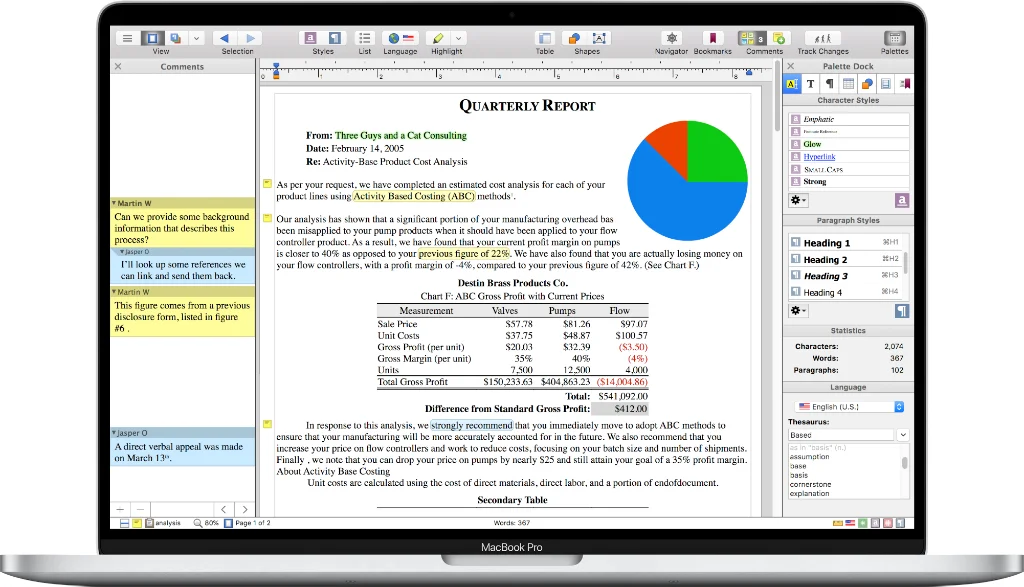
Among today’s links are markdown editors Cyberwriter, Wrangle and t-ext, and markdown viewer Mdterm. Plus a quick look at Nisus Writer Pro, a useful word processor. I first used it back in the 1990s, when I was converted over to it from WordStar by friend and magazine designer Joel Scott from the US. Even back then he had a lot to say about the ubiquity of Word.
- Nisus Writer Pro is an alternative to MS Word with all the writing tools you need, packed into one tidy package. It exports to .doc, .docx, .odf, .html, .epub, plain text and rich text. If you are coming from Word, you should feel at home; if you’re coming from a markdown background you should feel at home in plain text mode. Nisus Writer offers a free demo and charges $65 for a lifetime licence, which is not bad when compared to MS 365’s $129.99 per year. Available for macOS 10.13 through Sonoma, but it worked fine in Tahoe.
- Mdterm is a terminal-based markdown viewer written in Rust (requires 1.85+). It renders markdown files with syntax highlighting, styled formatting and interactive navigation.
- Cyberwriter, formerly Nabu Pro, is a native macOS markdown editor that transforms your documents into formatted PDFs and Word documents with no external dependencies. There is no Pandoc, no LaTeX and no command-line tools required. As with many of the current crop of markdown editors, you have no control over the editor/line width, nor the line-height. You can only change the line-height in the preview and alter the editor width by resizing the window. The developer is amenable, though. After an exchange on Reddit, he updated the line-height for the preview, but not the editor. I’ had assumed one look at the editor’s scrunched together text would have been explanation enough.
- Wrangle is a native macOS workspace for developers who live in Claude Code, Gemini and multi-agent workflows. Edit your claude.md files, run agent sessions in embedded terminals, inspect your work in an embedded browser, and get notified the moment an agent needs input or finishes. That way you’re never guessing which tab to check. $19 from the App Store.
- t-ext is an early stage – still in beta – app for macOS (Silicon only). It pretty much works the way I like to work, just words on a screen and nothing else to hinder my thoughts. The themes don’t work as far as I can tell and the settings could be looked into, but other than that all I can see is that the developer needs a bit of help with his English translation.