The Markdown Link no. 17
Links that attracted my attention recently
An occasional post from The Markdown Handbook.
Among today’s links are markdown editors Notable and NotesMe, a command-line tool called Markdown-to-Book, a free macOS utility called Markedly, and Docmd, a static site generator for your documentation.
- Notable is a macOS app. It’s simple, clean, does not accept folders but transforms your tags into folders, sort of. It’s a bit early to judge what Notable is going to be like if, indeed, it’s going to be like anything. The only options are light and dark themes, and the ability to tag. There are no font or readable line-length choices or, indeed, any preferences associated with the app. Nor does it carry over your tags, e.g. #tag, from a previous document, preferring you to add your own. I’ll let you be the judge.
- Markdown to Book is a command line tool that converts markdown files into print-ready books for Amazon KDP. One command can produce paperback PDF, hardcover PDF and Kindle EPUB with margins, typography, front matter and an optional table of contents. It is built for self publishers who want to write in plain markdown and skip the hell of Word or InDesign.
- Markedly is a free macOS utility that converts Word docs, PDFs, and spreadsheets to clean markdown. Drop in a file and get clean GitHub-flavoured markdown out. Supported formats include text (.docx, .doc, .rtf), spreadsheets (.xlsx, .xls and .csv), and PDFs. And text can be extracted from many image formats (e.g. .png, .jpg, .tiff, .heic, .gif, .bmp). Download it from the Mac App Store.
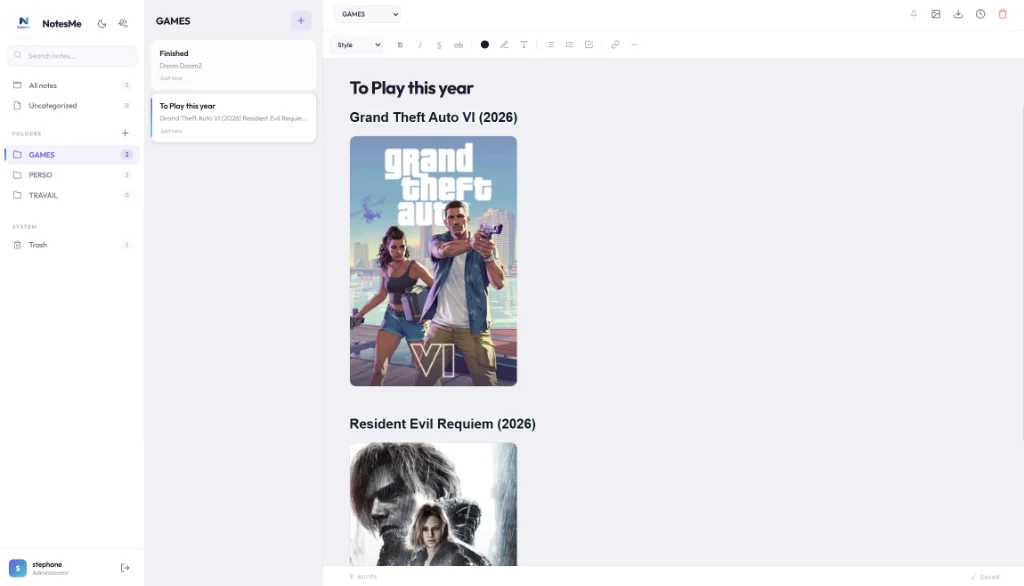
- NotesMe is a markdown-compatible, self-hosted note-taking app with a WYSIWYG interface. It’s lightweight and encrypted. Three simple commands get NotesMe up and running: pull the Docker image, configure your .env, then launch.
- Docmd is a minimalist, zero-config static site generator aimed at building documentation sites directly from your markdown files. There’s a live online editor if you want to try it out.