The Markdown Link no. 15
Links that attracted my attention recently
An occasional post from The Markdown Handbook.
Among today’s links are markdown editors Plumio, Snippets and MultiMarkdown Composer, wireframe editor Mockdown, and markdown browser Hike.
- Mockdown is a free browser-based ASCII wireframe editor. Sketch a user interface in minutes, export as markdown, paste into Claude Code or Cursor, and AI reads a wireframe faster than you can explain it. There are 20+ components available and no setup is necessary.
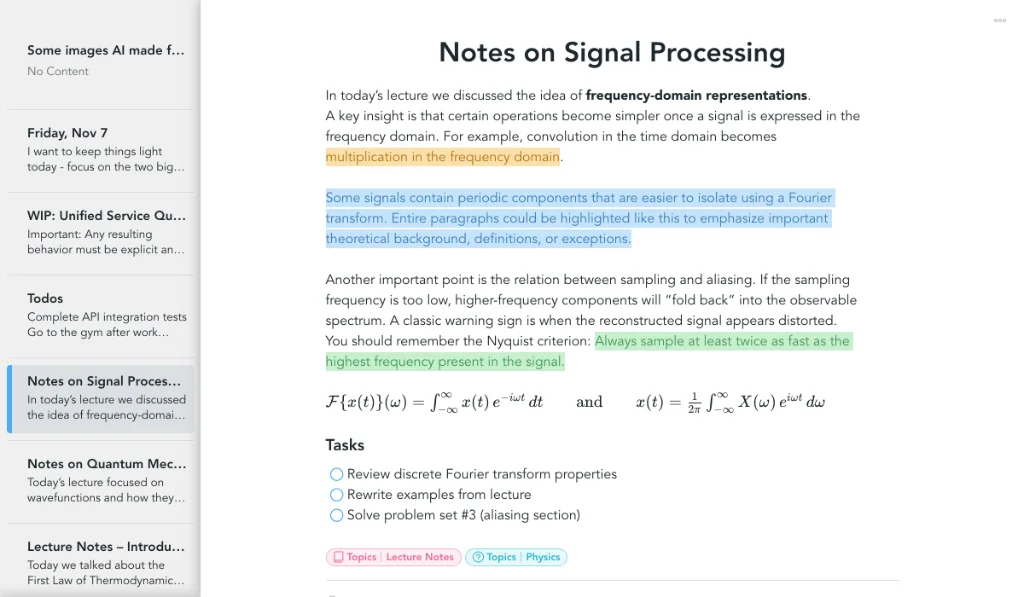
- Snippets’ (image above) developer says: “Markdown works well for technical documentation and collaborative workflows where content lives in version control. For note-taking, it quickly becomes a constraint.” I happen to disagree, as I’m sure many others do. Snippets does not offer a plaintext, portable note system, although it does allow you to export to markdown. Meanwhile, it stores notes as .json files buried deep in your OS, and gives them random names. I should add, though, that at least it has the good manners to tell you where the files are stored.
- Hike is a markdown browser for the terminal. It provides the ability to browse for and view local markdown files, as well as markdown files downloaded from the web. It also has shortcuts, which make it easy to view markdown files on popular git storage providers such as GitHub, GitLab, Codeberg and Bitbucket. To install Hike, use
pipx; there are other options available. - Plumio can be run from source or deployed with Docker. It is an open-source, self-hosted note-taking app powered by Milkdown with a real-time preview. Your data lives on your server. There is no tracking and there are no subscriptions messages to pester you. Plumio can be worked on by an entire team with different roles assigned to each person.
- MultiMarkdown Composer v7 “doesn’t currently include OpenDocument (ODT) as an export format. Otherwise, v7 is ready for the public” and offers the same funtions as v6. MultiMarkdown was one of the first markdown apps I came across, after nvAlt. I used it because it offered a live preview and the only way to get that from nvAlt was by installing another app, Marked. It will be interesting to see how it compares with the modern offerings.